Job Settings
|
|
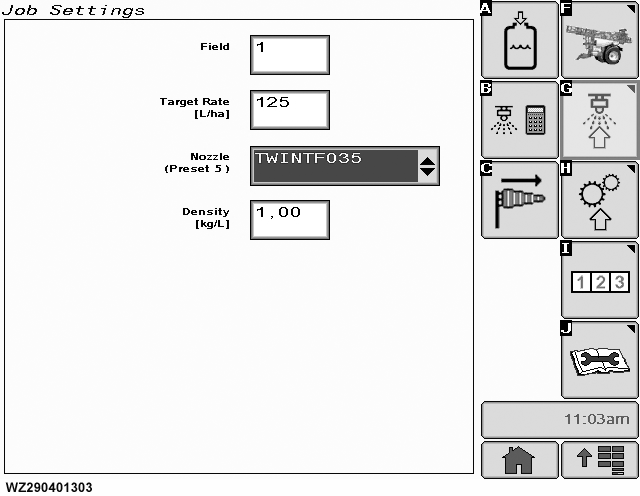
"Job Settings" allows the operator to prepare the sprayer for a new spray job. It can be entered by selecting softkey G.
Field
select the field number (up to 16 different memories are available) to be used for the next spraying job (memory location is for saving details of sprayed area, volume, time, distance, etc.). The value in the window will change to white, with a black background to indicate that the value can be changed with the scroll wheel. If the value has been changed, press the "Enter Button" to confirm and store the new value.
Target Rate
which is in l/ha can be changed by selecting the field. A numeric keypad will appear, type in the required value and enter. The new value will now be used.
Nozzle (Preset 5)
this allows the operator to select one of the pre-programmed nozzles which will then be used for the next spraying job. Up to 5 different nozzles can be pre-programmed (in "Nozzle
|
(Presets 5)" on the "Boom Settings" tab in "Machine Settings"). On selecting the "Nozzle" field, a drop-down list will appear, coose one of the available nozzles. For each pre-programmed nozzle there is also a pre-programmed target application rate. If a different nozzle is selected, the target application rate for that nozzle will also automatically be adjusted.
Density
is given in kg/l, selecting this field allows the operator to change the value of the density (specific gravity) of the liquid in the tank. This value needs to be changed when spraying with a pressure based regulation and when the specific gravity of the spraying liquid (e.g. liquid fertilizer) is different than 1.00 kg/l. If the machine is equipped with a flow and a pressure sensor, this value needs to be entered as well, in order to prevent activation of the alarm Flow /Pressure Cross Level Check (see also "Setup Alarm Configuration" in the Section "Factory Setup")
Tank Filling
select softkey A for tank filling screens.
|
|
|
WZ00232,0000027 -19-12OCT06-1/2
|
|
Nozzle Calculator
select softkey B to display the nozzle calculator to check all job settings (especially nozzle selection), you can calculate working speed, pressure, nozzle flow rate and droplet size.
Wind Speed
select softkey C to measure wind speed.
Boom Height
displays the target nozzle height in cm, if the machine is equipped with BoomTrac
™
.
|
When BoomTrac is active, the boom height above the target (crop or soil) will automatically be adjusted to the correct spray height for this nozzle.
See "BoomTrac Settings & Height Control" in "Accessories" for further options for "Job Settings" screen.
|
|
BoomTrac is a trademark of Deere & Company
|
WZ00232,0000027 -19-12OCT06-2/2
|
|