Wind Speed
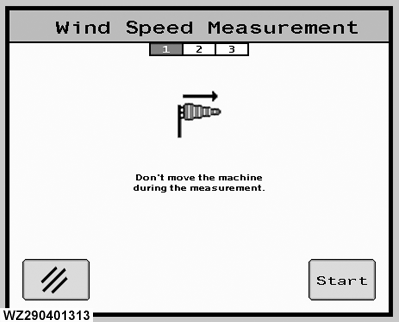
The "Wind Speed" menu can be entered by selecting softkey C from "Job Settings". The wind speed measurement process will be displayed in three steps, indicated by the green highlighted number under the screen title.
Step 1.
It is important that the machine should be stationary during wind speed measurement.
Start
begins the wind speed measurement.
Cancel
returns you to "Job Settings".
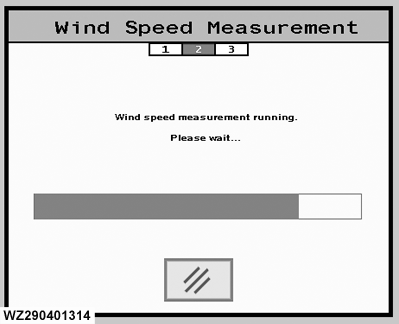
Step 2.
The measurement process is running and a message to this effect will be displayed on the screen. A green bar will show the progress.
Cancel
stops the measurement and returns you to "Job Settings".
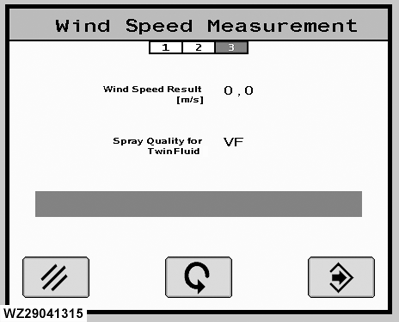
Step 3.
This screen shows the result of the wind speed measurement.
Wind Speed Result
this average is given in m/s.
Spray Quality for TwinFluid
a recommendation for the spray quality (BCPC drop size classification) will be given, based on the actual weather conditions. The controller will recommend the finest possible spray quality, but still with an acceptable low amount of spray drift for the current wind conditions. If the wind speed is higher a coarser spray quality will be recommended, if the wind speed is lower a finer spray quality will be recommended.
1
Cancel
returns you to "Job Settings".
Restart
go back to step 1.
Enter
the advised droplet size will be used for the setting on the main page, then returns you to "Job Settings".
|
Wind Speed Measurement - Step 1
Wind Speed Measurement - Step 2
Wind Speed Measurement - Step 3
|