|
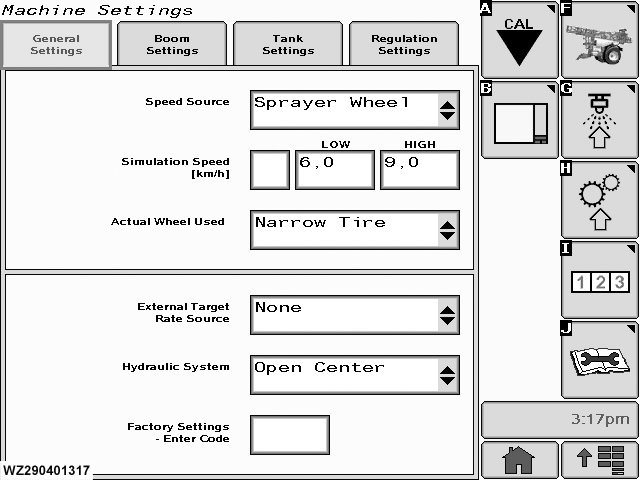
"General Settings" tab can be found in "Machine Settings".
Speed Source
there are four options: GPS, Sprayer Wheel, Tractor Bus and the Tractor Wheel.
Simulation Speed
has three parts. Enter values for
High
and
Low
by selecting, then type in requirement on the numeric keypad. The
check box
activates the simulation to test the sprayer and calibrate the flow sensor.
Actual Wheel Used
Use the drop down list to toggle between two pulse values for the wheel sensor, indicated as "Narrow Tire" and "Wide Tire". For each selection, there is a corresponding wheel calibration pulse number. This allows quick selection of another set of wheels.
|
External Target Rate Source
set to
None
for normal spraying applications. This parameter should only be set if an external target is used as input (through RS-232 serial port connection). This can be used if the sprayer is used for application of liquid fertilizer using the
Hydro-N-Sensor
. Set to
Appl. Map
if using the information on the data card.
Hydraulic System
select the type of hydraulic system on the tractor, "Open Center", "Closed Center" or "Load Sensing". Enter the correct hydraulic system of the tractor which will pull the sprayer.
Factory Settings - Enter Code
this can only be accessed with an authorised code.
|