|
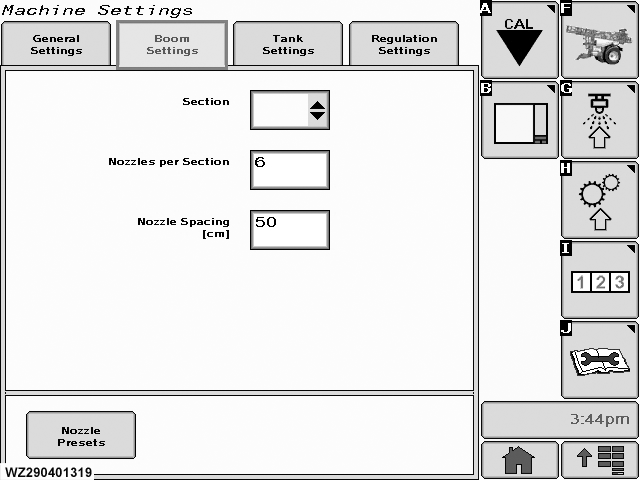
The menu can be entered by selecting the "Spray Boom" tab in "Machine Settings".
Section
select the field to get access to the drop down menu for the different sections on the boom (e.g. L1-L2-L3-L4-R4-R3-R2-R1-C for booms with 9 sections), highlight your selection and enter. All sections need to be programmed.
Nozzles per Section
enter the number of nozzles per section here, increment or decrement using the scroll wheel. This must be repeated for all boom sections. Please see also "Section Division of
|
Spray Booms" in the section entitled "Spray Boom" for the correct number of nozzles per section on your spray boom. (Remember when using drop hoses, that the number of nozzles per section is the double amount, since nozzle spacing is then 25 cm)
Nozzle Spacing
enter the distance between the nozzles. This is normally 50.0 cm for spray nozzles, except for drop hoses where it is 25.0 cm.
Nozzle Presets
enter menu, a new screen will appear to change the nozzle preset configuration (nozzles on the sprayer).
|