|
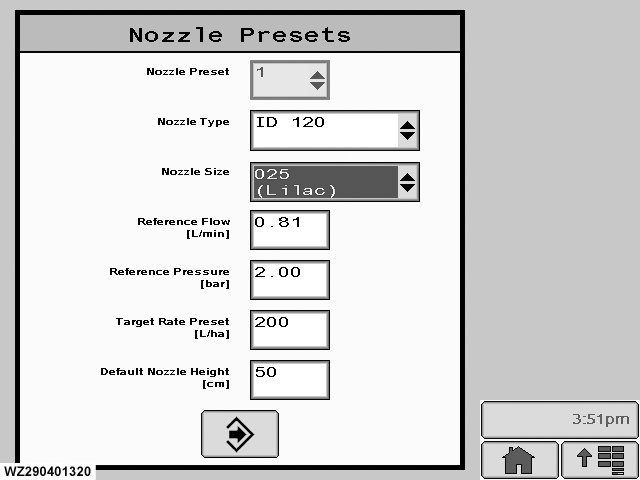
The presets can be found on the "Spray Boom" tab in "Machine Settings".
Nozzle Preset
up to five different types of nozzles can be pre-programmed for a sprayer. The reference number (1 to 5) is used to distinguish between the different nozzle presets. The number can be entered with the drop down list.
Nozzle Type
select to display a drop down list from which the correct nozzle type (e.g. XR-110°) can be selected.
Nozzle Size
enter the correct nozzle size for the selected nozzle type from a drop down list and the nozzle flow rate for a given reference pressure can be calibrated.
Reference Flow
the nozzle flow rate for the reference pressure can be entered here (numeric keypad). When the pressure sensor is calibrated, the nozzle flow rate (also for new nozzles !) has to be calibrated.
Reference Pressure
at which the nozzle flow rate is calibrated, enter with the numeric keypad (decimal point required).
|
Target Rate Preset
enter new value to change the pre-programmed target application rate for the selected nozzle with the numeric keypad (decimal point required).
Default Nozzle Height
this value is a default height for the selected nozzle when using BoomTrac. Highlight and enter, to increment or decrement value use the scroll wheel , press enter to set.
Enter
stores the values for the nozzle preset number, then returns to the "Job Settings" menu.
The nozzle flow rate has to be calibrated as follows:
1.
Adjust the liquid pressure regulator in manual mode until the reference pressure (e.g. 2.0 bar) is shown on the display.
2.
Capture the nozzle flow rate (l/min) over a period of one minute from several nozzles.
3.
Calculate the average nozzle output and enter this value as "Reference Flow" in the field using numeric keypad (decimal point required).
|