Main Page Layout

WZ290401368

Main Page Layout

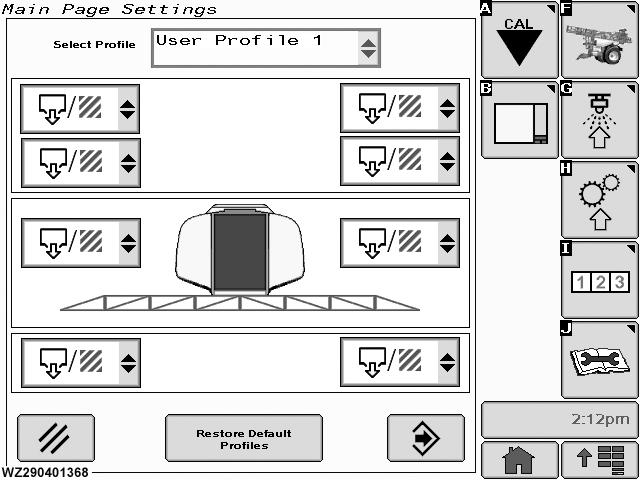
The "Main Page Layout" menu is entered via softkey B from "Machine Settings".

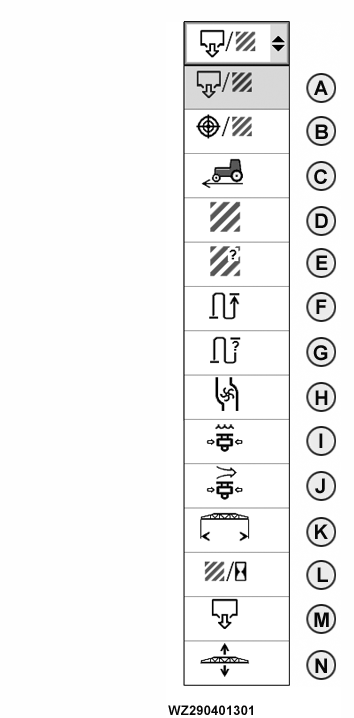
There are eight individual selectable fields with drop down menus in the display field. Select in the desired position the required icon from the drop down menu.

When you have finished your selection, save the changes by pressing "Enter". A confirmation screen will appear. Follow the displayed instructions as to whether you want to "Just use the Layout" or "Save Layout as Profile". The screen will return to the "Main page".

WZ00232,0000032 -19-04OCT06-1/2


Profiles
Select Profile In the (drop down menu) you can choose from the following options: "Standard", "TF Machine", "BoomTrac", "TF + BoomTrac", "User Profile 1" and "User Profile 2". Restore Default Profiles will reset all six profiles to the factory defaults. Cancel returns to "Main page" without saving settings.


A-Applied rate
B-Target rate
C-Current speed
D-Sprayed area
E-Remaining area
F-Sprayed distance
G-Remaining distance
H-Actual flow rate
I-Liquid pressure
J-Air pressure (TwinFluid only)
K-Spray boom working width
L-Current performance
M-Total sprayed volume
N-Spray boom height (BoomTrac only)

WZ290401301

Display Selection

WZ00232,0000032 -19-04OCT06-2/2