|
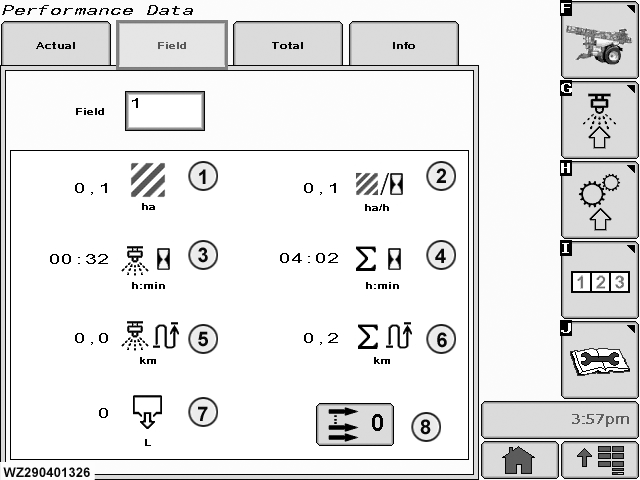
"Field" data can be found by selecting the (Field) tab in "Performance Data" (softkey I).
Field
there are 16 different memories, where data can be stored. In "Job Settings", the field memory (numbered from 1-16) can be entered where the data of the next job needs to be stored. Select the field (increment or decrement the field number with the scroll wheel on the display control), lets the operator choose from one of the sixteen different memories.
1
Spray Area (ha): The number of hectares sprayed.
2
Current performance (Sprayed area) in ha/h.
3
Spray Time (h:min): The spraying time for the field.
|
4
Total Time (h:min): The total time the controller (sprayer) has run.
5
Spray Distance (km): The distance travelled during spraying.
6
Total Distance (km): The total distance travelled.
7
Spray Volume (l): The total number of liters sprayed.
8
Clear the settings (zero values) for this field. A confirmation screen will appear. "Cancel" will leave the totals as they are, and "Enter" will clear the totals. If the memory is not cleared before a new job is started and this field is selected, then the data are cumulated. Automatically a warning appears that the field is about to be cleared. Press continue to clear the field.
|