|
Softkey C
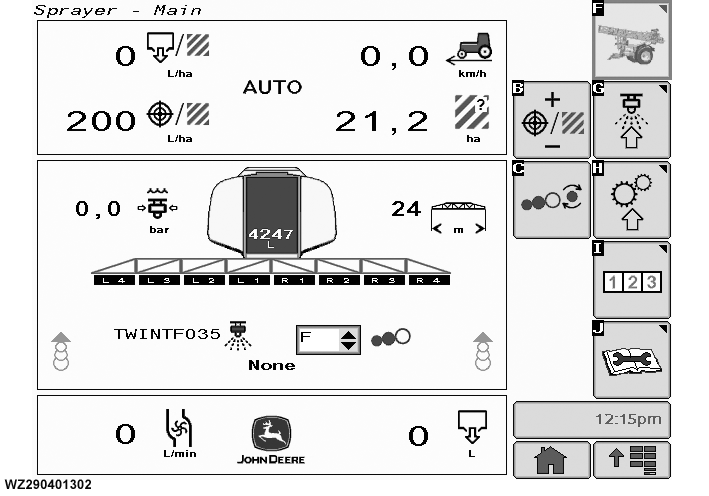
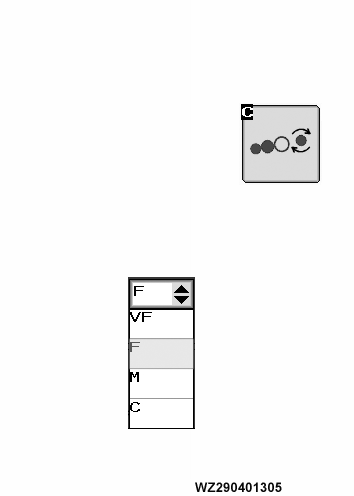
"TwinFluid Spray Quality": changes the spray quality setting when the TwinFluid nozzle is selected in Job Settings. By selecting softkey C, the desired spray quality (droplet size) for the Twin Fluid nozzle can be chosen by stepping through the available selections. The spray quality can be set to either "VF" for very fine, "F" for fine, "M" for medium or "C" for coarse. The control system will then automatically adjust and regulate the air pressure to achieve the desired spray quality, if the MAN/AUTO Switch No. 2 on the control box EHC-2 is set to AUTO position. See "Low Drift Settings" in "Operating of the Machine" for other functions of (TwinFluid Spray Quality) softkey C.
|
TwinFluid Spray Quality (Softkey C) with Drop-Down Menu
|
|
|
WZ00232,0000041 -19-11OCT06-1/2
|
If a conventional nozzle has been selected in Job Settings, softkey C will set the desired spray quality (droplet size) for the nozzle by stepping through the available selections. The current spray quality of the nozzle at the actual pressure according to the BCPC droplet size classification is shown during spraying, but not regulated. The spray quality can be either "Very Fine", "Fine", "Medium", "Coarse", "Very Coarse" or "Extremely Coarse".
Spray Quality
"Drop-Down Menu": when selected displays all the available settings, this done by highlighting it in the display field and confirming. Pick the required spray quality and enter.
|
|
|
|
WZ00232,0000041 -19-11OCT06-2/2
|
|