Tank Sensor Calibration
|
|
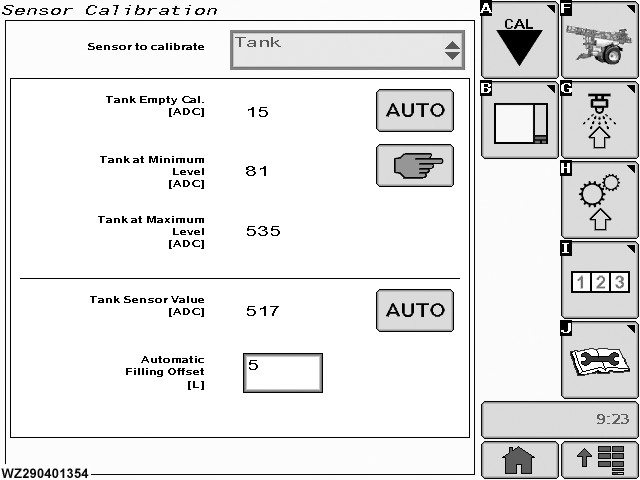
The "Tank" calibration menu can be entered via the drop down menu in the field "Sensor to Calibrate". It will show the current settings for the items listed below. Three tank levels have to be calibrated for each new machine (tank pressure sensor):
*The minimum and maximum tank levels are factory programmed in factory settings. See also "Tank Configuration" in "Factory Settings". The tank level sensor is a pressure sensor fitted in the bottom of the tank and measures the pressure of the liquid in the tank above the sensor. This value is then used to calculate the actual tank volume. The tank pressure sensor is a very accurate and sensitive |
sensor. The sensor has a working range from 0-250 mbar with a corresponding output of 0-20 mA. The analog current signal is converted into a digital value by a 10-bit converter (ADC value between 0 to 1023). Each tank pressure sensor needs to be calibrated.
|
WZ00232,0000045 -19-10OCT06-1/8 |
|
|
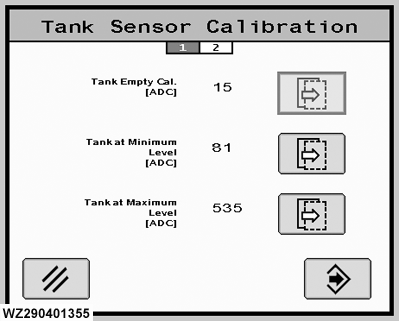
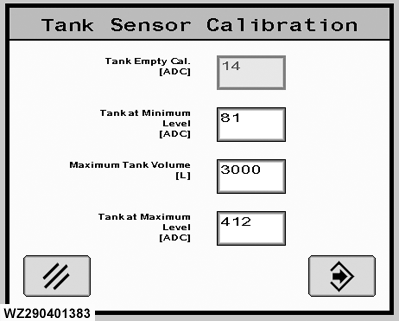
"Tank at Minimum Level" and "Tank at Maximum Level". Choose the "Next" button to select which.
|
WZ00232,0000045 -19-10OCT06-2/8 |
|
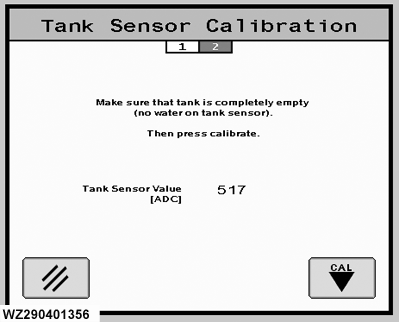
Automatic - Tank Empty Cal. The calibration of the tank pressure sensor at empty level needs to be done as follows: 1.
Make sure that the tank is completely empty and the tank sensor must be free of water and completely dry.
|
|
WZ00232,0000045 -19-10OCT06-3/8 |
|
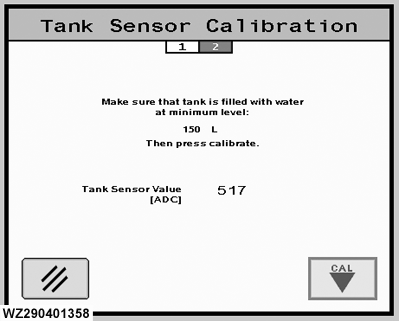
Automatic - Tank at Minimum.
In this calibration step of the tank level sensor, the tank must be filled to a minimum level, determined by the factory and set in "Factory Settings". The GreenStar 2 sprayer control system will use linear interpolation to calculate the current tank level when it is below this level. Above this level the calibration table is used (Factory Settings). The calibration of the tank pressure sensor at minimum level needs to be done as follows: 1. Make sure that the tank is filled with water to the minimum level. This amount of water (40 liters) needs to be measured accurately (e.g. with a calibrated flow sensor or balance) and entered into the tank. 2. The actual tank level sensor value is shown on the screen. 3. Press "CAL" button to calibrate. The sensor ADC value should be at least 2 units higher than the empty calibration value or otherwise a calibration error will be shown. 4. The screen will return to the "Tank Sensor" menu after calibration. |
|
WZ00232,0000045 -19-10OCT06-4/8 |
|
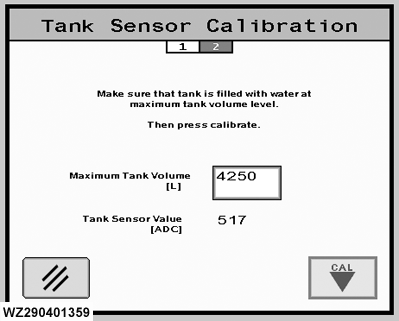
Automatic - Tank at Maximum.
The calibration of the tank level sensor at maximum (level is factory set in factory Settings) needs to be done as follows: 1. Make sure that the tank is filled with water to the maximum level:
* These quantities need to be measured accurately (e.g. with a calibrated flow sensor or balance) and filled into the tank. Each tank can vary in size due to the manufacturing process. * The minimum and maximum tank levels are factory pre-programmed in factory settings and depending on the actual tank size. If required these values can be adjusted. See also "Tank Configuration" in "Factory Setup" to enter the actual value. 2. The actual tank pressure sensor value is shown on screen. 3. Press "CAL" button to calibrate. The sensor ADC value should be at least 50 units higher than the calibration value at minimum tank level or otherwise a calibration error will be shown. 4. The screen will return to the "Tank Sensor" menu after calibration. |
|
WZ00232,0000045 -19-10OCT06-5/8 |
|
Manual Calibration
|
|
WZ00232,0000045 -19-10OCT06-6/8 |
|
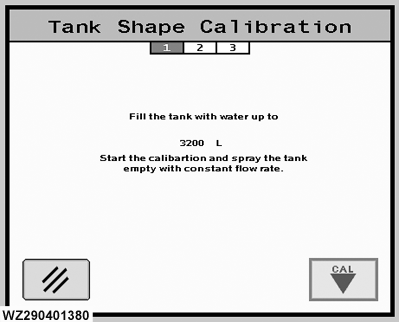
Automatic - Tank Shape Calibration
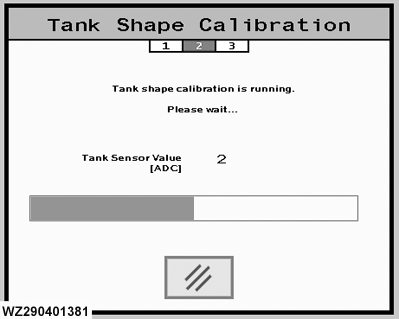
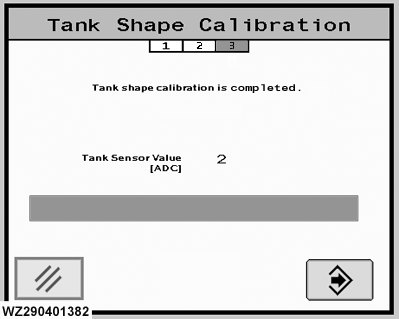
The input from the tank level sensor has to be converted into a value to determine the actual tank volume. First the tank level sensor has to be calibrated when the tank is empty, at minimum and at maximum level in the menu "Tank Sensor". If this is done, the intermediate steps have to be calibrated with the "Tank Shape Calibration". The actual calibration of the shape of the tank is done by spraying the tank empty at a constant flow, starting from the "Maximum Tank Volume" until the "Minimum Tank Volume" is reached. The minimum tank volume is used since a constant flow cannot be guaranteed below the minimum level due to air sucking at the bottom of the tank. The actual calibration of the complete tank must be done starting from a completely filled tank. There are three steps to the process shown on screen. The calibration procedure is as follows: 1.
Prepare the machine for spraying in manual mode (at constant PTO speed). The spraying pressure should be absolutely constant (set computer in manual mode). During the calibration process the sprayer should not be moved or touched, otherwise noise signals could be created.
|
|
WZ00232,0000045 -19-10OCT06-7/8 |
|
9.
When the tank is below the minimum level, the calibration procedure stops automatically and returns to the "Tank Calibration" menu.
|
WZ00232,0000045 -19-10OCT06-8/8 |