Boom Tilt Calibration
|
|
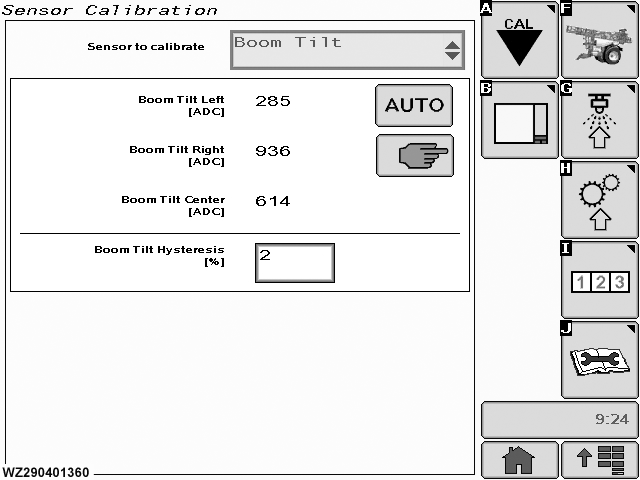
The "Boom Tilt" calibration menu can be entered via the drop down menu in the field "Sensor to Calibrate". It will show the current settings for the items listed below. If the sprayer is fitted with a boom tilt correction through rotary switch, the potentiometers of the control box and the boom tilt actuator have to be adjusted in relation to each other. |
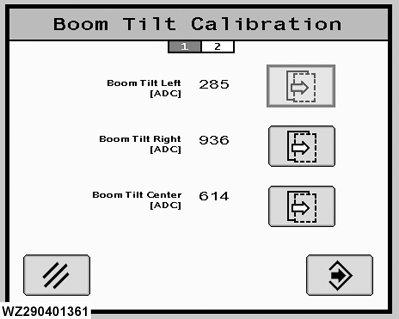
corresponding with the center position of the potentiometer of the control box is shown here. This value always has to be calibrated.
|
WZ00232,0000046 -19-12OCT06-1/4 |
|
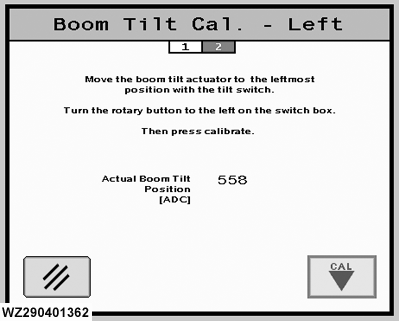
Automatic - Boom Tilt Cal. - Left
The description of the calibration procedure is shown on the screen: Move the boom balance actuator to the leftmost position with the toggle switch on the control box (switch 19). Then press "CAL" button to start the calibration. Actual Boom Tilt Position [ADC] value is shown in the screen center. The "Cancel " button will return you to the "Boom Tilt Calibration" page. |
|
WZ00232,0000046 -19-12OCT06-2/4 |
|
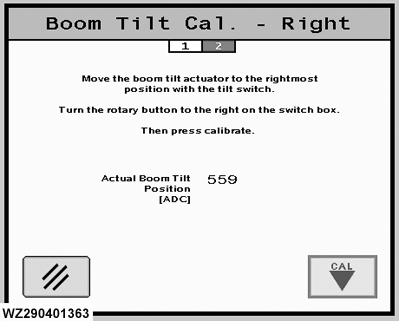
Automatic - Boom Tilt Cal. - Right
The description of the calibration procedure is shown on the screen: Move the boom balance actuator to the rightmost position with the toggle switch on the control box (switch 19). Then press "CAL" button to start the calibration. Actual Boom Tilt Position [ADC] value is shown in the screen center. The "Cancel " button will return you to the "Boom Tilt Calibration" page. |
|
WZ00232,0000046 -19-12OCT06-3/4 |
|
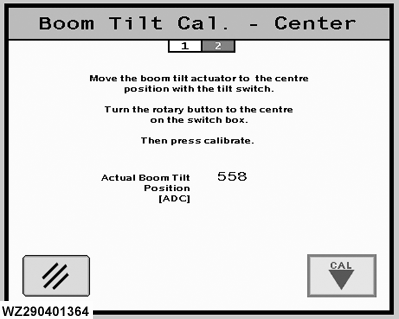
Automatic - Boom Tilt Cal. - Center
The description of the calibration procedure is shown on the screen: Move the boom balance actuator to the centermost position with the toggle switch on the control box (switch 19). Then press "CAL" button to start the calibration. Actual Boom Tilt Position [ADC] value is shown in the screen center. The "Cancel " button will return you to the "Boom Tilt Calibration" page. |
|
WZ00232,0000046 -19-12OCT06-4/4 |