Lightbar System Description
|
|
|
|
|
|
NOTE: The Lightbar performs a 5 seconds LED test with all LEDs illuminated upon power up. The Lightbar system is designed to be connected to the vehicle CAN Bus or to be operated as a standalone system and can be used with or without a GreenStar™ display in conjunction with the StarFire GPS receiver (see "Lightbar System-Standalone Configuration" or "Lightbar System-Display Configuration" in this Section). |
NOTE: Whenever a display is detected on the CAN bus, the Lightbar system will be placed into companion mode. In this mode, the Lightbar buttons are disabled and all guidance setup is performed in the GreenStar™ display. Refer to relevant Display Operator's Manual. The Lightbar system turns on with the vehicle key switch. |
OUCC002,00029B0 -19-07JUL08-1/2 |
|
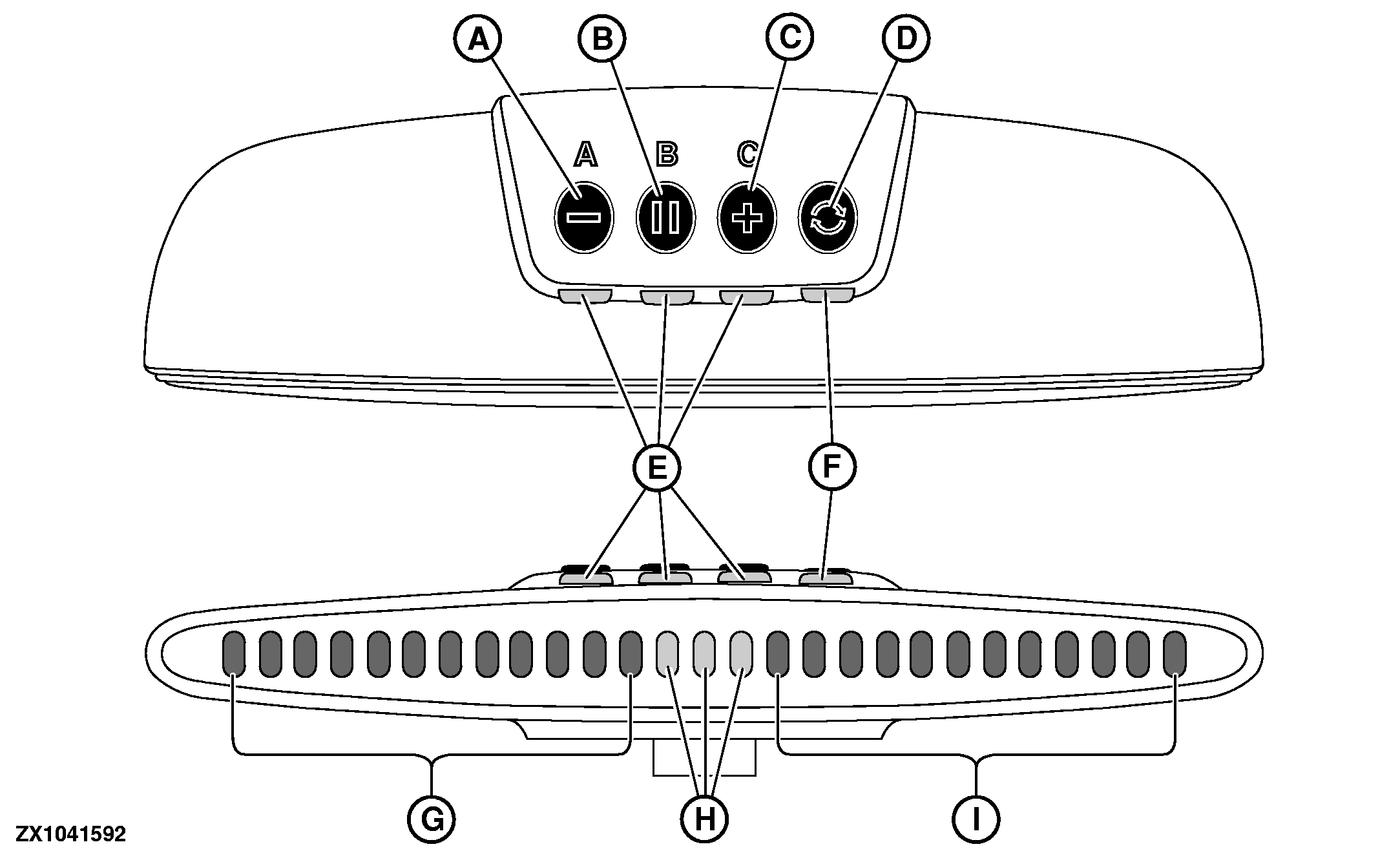
As a standalone system, the Lightbar can be operated in three different modes by pressing Mode button (D). Depending on the mode selected, the buttons (A), (B) and (C) will have different functionality (see "Operating Lightbar System" in this Section): 1.
Run Mode:
Allows the operator to adjust LED brightness by using buttons (A) or (C) or do a center track by using button (B).
IMPORTANT: The Lightbar system checks the GPS signal quality. Either WAAS, EGNOS, SF1, or SF2 is required for Lightbar system to function. Without the required differential quality, no navigation LEDs will be displayed on the lightbar. A Starfire Configurator Software is available from Stellar Support |
(http://stellarsupport.deere.com) for activating and setting up SF1 and SF2 signals from a laptop. An additional harness is required-Contact your John Deere dealer. The LED (F) beneath the mode button (D) indicates the GPS signal quality in the following manner: Green = Good quality. Amber = Signal available but not sufficient to drive parallel tracking. Red = no GPS signal available. Red flashing = no GPS receiver detected. IMPORTANT: The tracking LED navigation is possible when steering in forward direction to the desired path only. The Lightbar system does not support the vehicle reverse operation. At first time boot-up, the factory settings are:
|
 CAUTION:
The Lightbar system MUST be turned OFF during road transport. Press and hold Mode Button (D) for 2 seconds to turn off the Lightbar.
CAUTION:
The Lightbar system MUST be turned OFF during road transport. Press and hold Mode Button (D) for 2 seconds to turn off the Lightbar.
OUCC002,00029B0 -19-07JUL08-2/2 |