Operating Lightbar System

The Lightbar system can be operated under three operating modes.

The Run Mode (I) is automatically activated (normal operation) if a valid setup has been performed (Refer to "Operating Lightbar Under Run Mode").

NOTE: If a valid setup has not been performed the Lightbar automatically starts under Setup mode.

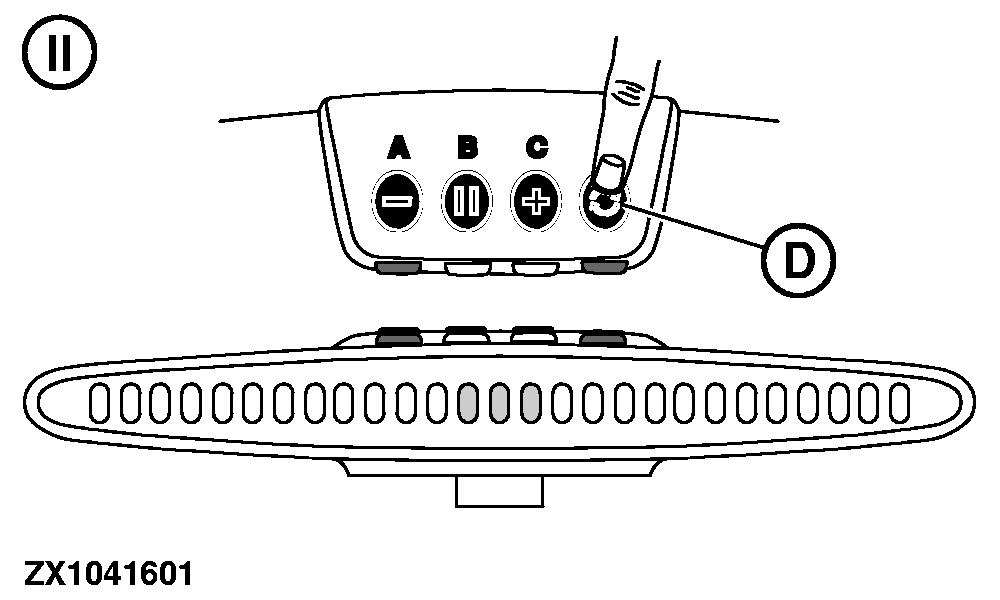
Press the button (D) to select the Setup Mode (II)-The LED beneath the A button is activated to confirm selection of Setup Mode (Refer to "Operating Lightbar Under Setup Mode").

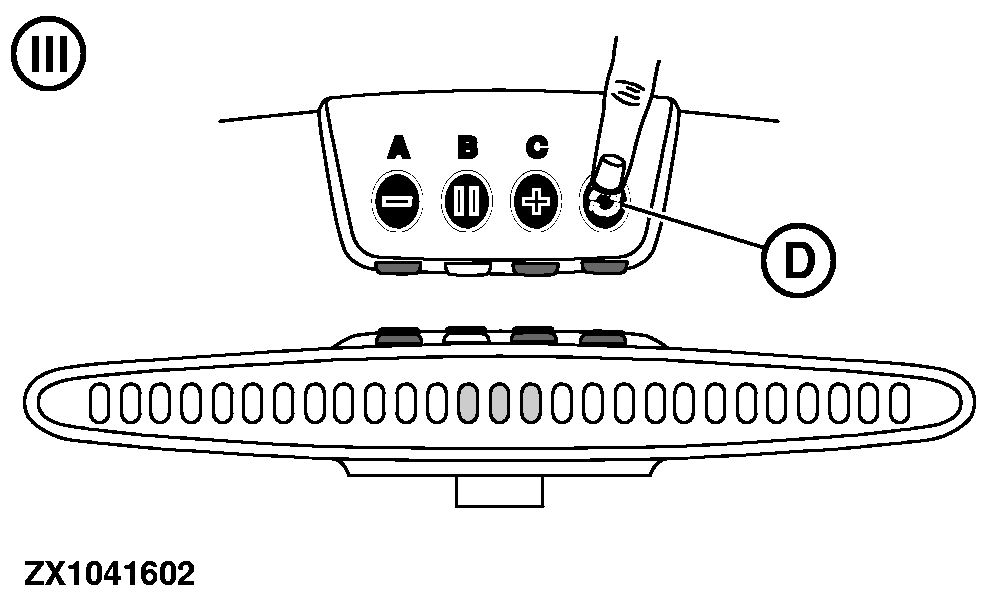
Press the button (D) to select the Adjust Mode (III)-The LEDs beneath the A and C buttons are activated to confirm selection of Adjust Mode (Refer to "Operating Lightbar Under Adjust Mode").


I-Run Operating Mode
II-Setup Operating Mode
III-Adjust Operating Mode
D-Operating Mode Selection Button

ZX1041593

Run Operating Mode

ZX1041601

Setup Operating Mode

ZX1041602

Adjust Operating Mode

OUCC002,00029B1 -19-07JUL08-1/5


Operating Lightbar Under Run Mode

The Run Mode is automatically activated under normal operation if a valid setup has been performed. To be sure that run mode is activated check that no LEDs beneath the A , B or C buttons are activated. If necessary, press button (D) until LEDs beneath buttons A , B or C are all off to access the run mode. Select this operating mode to:

  • Increase/decrease the LED brightness by pressing the button (A) or (C).
  • Do a center track by pressing the button (B).
    • The system activates the center tracking indicator LEDs (F). When driving on track only these LEDs are activated.
    • If a track offset to the right-hand side is detected the system activates the L.h.offset tracking indicator LEDs (E) proportionally to the offset detected (about 10 cm (3.93 in.) per LED (E) activated). This LED activation informs the operator that he must steer to the left-hand side until all L.h.offset tracking indicator LEDs (E) are off.
    • If a track offset to the left-hand side is detected the system activates the R.h.offset tracking indicator LEDs (G) proportionally to the offset detected (about 10 cm (3.93 in.) per LED (G) activated). This LED activation informs the operator that he must steer to the right-hand side until all R.h.offset tracking indicator LEDs (G) are off.

Track Finder Functionality:

To help the operator in finding the track spacing while turning in headland, the system changes to flashing LEDs (E) or (G) everytime the gauge limit of the lightbar is reached. The flashing frequency indicates the distance from the track:

  • A higher frequency means closer to the track.
  • A lower frequency means further away from track.

NOTE: Flashing of LEDs starts at a distance from track of 1,3 m (4 ft 3.12 in.) at 10 Hz and changes to 1 Hz at track spacing/2.

ZX1041594

Operating Lightbar-Run Mode


A-Decrease LED Brightness Button
B-Center Track Button
C-Increase LED Brightness Button
D-Operating Mode Selection Button
E-L.h. Offset Tracking Indicator LEDs (Red)
F-Center Tracking Indicator LEDs (Green)
G-R.h.Offset Tracking Indicator LEDs (Red)

OUCC002,00029B1 -19-07JUL08-2/5


ZX1041595

Operating Lightbar-Setup Mode


A-Set point A Button
B-Set point B Button


C-Set point C Button
D-Operator Input Indicator LED


E-Operating Mode Selection Button


X-Track Spacing

Operating Lightbar Under Setup Mode

After power up, press button (E) to access setup mode. The LED beneath the A button is activated to confirm selection of the Setup Mode. Select this operating mode to:

  • Set a track as initial setup . The operator needs to define points A, B and C (see illustration). Points A and B are used to calculate the heading and point C is used to calculate the track spacing, which is the distance (X) between the parallel tracks. Setup initial track as follows:

    a. The system turns on the operator input indicator LED beneath the button (A) and waits for the operator input to set A point. Press button (A) to start heading calculation.

    NOTE: Current position of point A is stored.


    b. The system turns on the operator input indicator LED (flashing) beneath the button (B). The system checks that the operator has driven at least 3 m (9 ft 10 in.) then operator input LED becomes solid. The system waits for the operator input to set B point. Press button (B) when point B is reached.

    NOTE: New A-B line is calculated and stored.


    c. The system turns on the operator input indicator LED (flashing) beneath the button (C). The system checks that the vehicle heading is greater than 90 degrees from A-B line then operator input LED becomes solid. The system waits for the operator input to set C point. Press button (C) for less than 2 seconds when point C is reached.

OUCC002,00029B1 -19-07JUL08-3/5


    NOTE: Vehicle position C and track spacing (X) are calculated and stored. System switches to Run Mode.

    NOTE: Pressing button (C) longer than 2 seconds will recall the latest stored track spacing (X). System switches to Run Mode.

  • Recall a track spacing previously set .

    Whenever the operator needs to keep his track spacing a new A-B line can be setup and current

    • track spacing (X) recalled by pressing button (C) longer than 2 seconds (see explanation above for initial track setup).

    NOTE: During initial track setup procedure, all tracking indicator LEDs are off.

    Once the track spacing (X) has been setup: Press button (E) twice to select adjust mode and fine tune track spacing (X), if necessary. See "Operating Lightbar Under Adjust Mode".

    OUCC002,00029B1 -19-07JUL08-4/5


    Operating Lightbar Under Adjust Mode

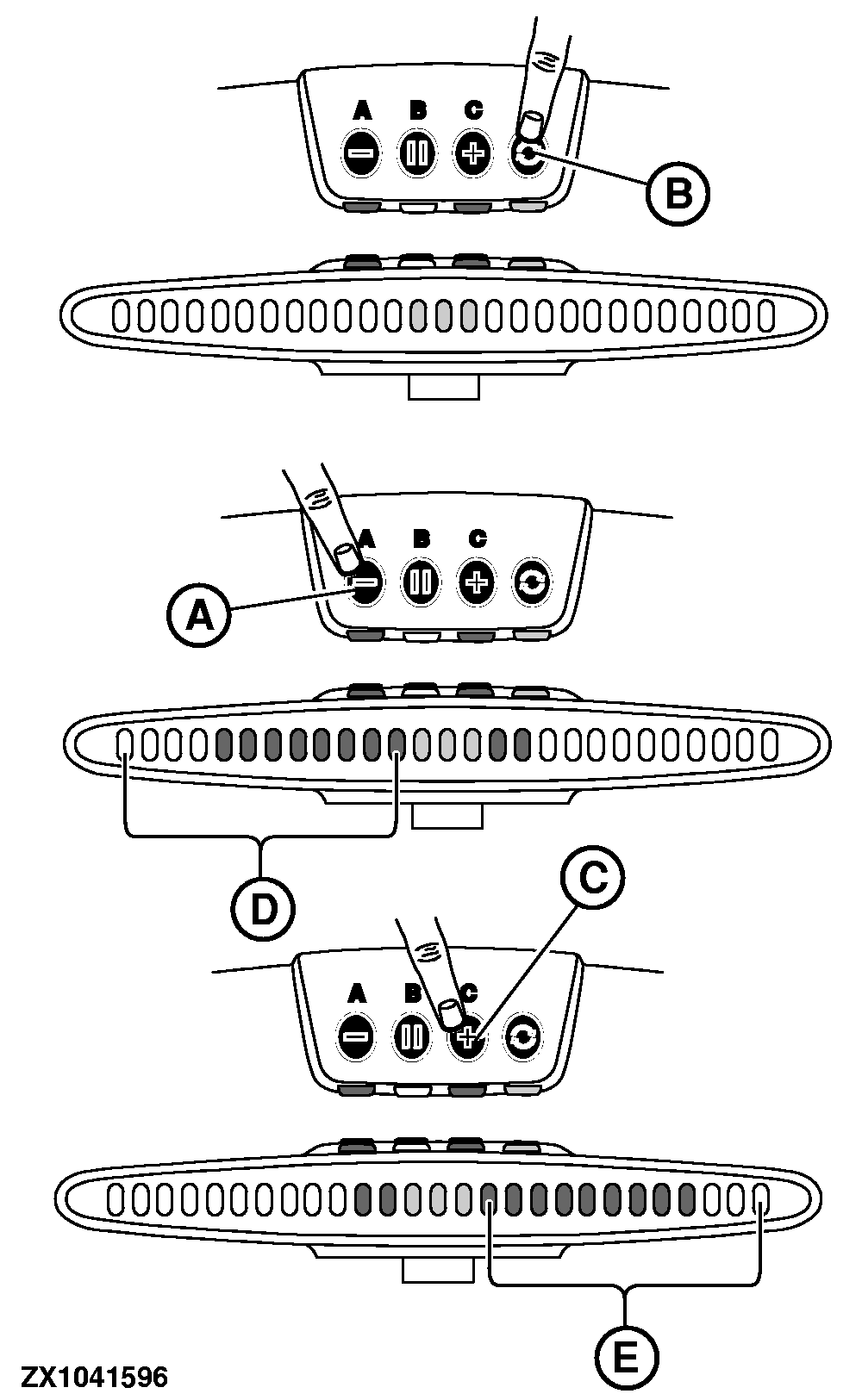
    After power up, press button (B) twice to access adjust mode. The LEDs beneath the A and C buttons are activated to confirm selection of adjust mode. Select this operating mode to fine tune the track spacing:

    • The system turns on the operator input indicator LED beneath the buttons (A) and (C) as shown opposite.
    • Press button (A) to decrease track spacing. Each tracking indicator LED (D) activation represents 10 cm (3.93 in.) of track spacing decrement.
    • Press button (C) to increase track spacing. Each tracking indicator LED (E) activation represents 10 cm (3.93 in.) of track spacing increment.


    A-Decrease Spacing Button
    B-Operating Mode Selection Button
    C-Increase Spacing Button
    D-Decrease Tracking Indicator LEDs (Red)
    E-Increase Tracking Indicator LEDs (Red)

    ZX1041596

    Operating Lightbar-Adjust Mode

    OUCC002,00029B1 -19-07JUL08-5/5