iSteer Plough - SETUP Page
ZX1043376-UN-21NOV09
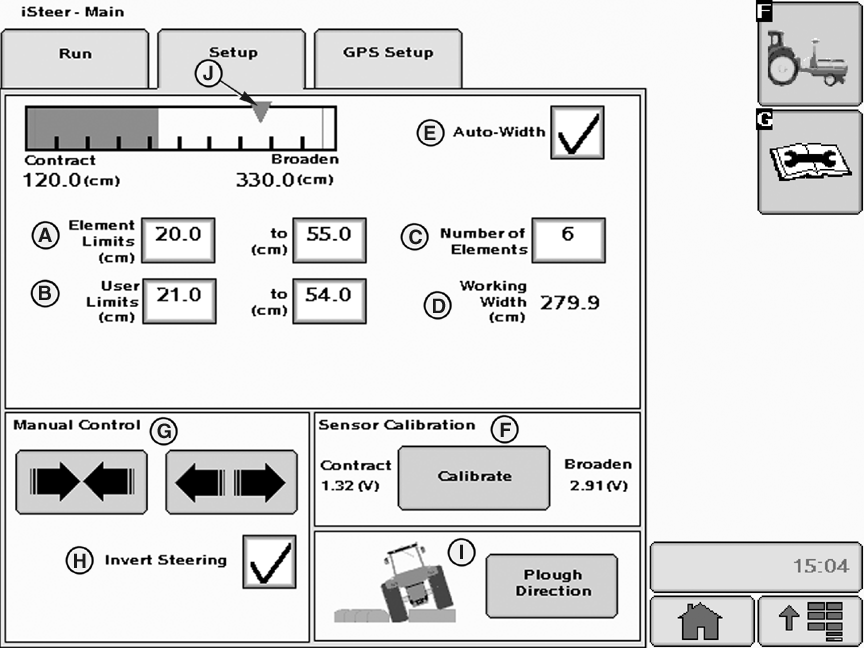
A - Element Limits (cm)
B - User Limits (cm)
C - Number of Elements
D - Working Width (cm)
E - Auto-Width Check Box
F - Calibrate Button
G - Manual Control
H - Invert Steering Check Box
I - Plough Direction Button
J - Desired Working Width Cursor
The SETUP page allows the operator to:
- Set plough element limits (A) between 20 and 60 cm (7 and 24 in.)
- Set plough element user limits (B) which can be the same as or within the range of the element limits (A).
- Set the number of plough elements (C) between 3 and 15 (default value is 3).NOTE: The values of the plough element limits (A), (B) and the number of elements (C) must be consistent with the working width (D) which corresponds to the track spacing defined on the Guidance screen.
- Check Auto-Width box (E) whenever the plough needs to move to working width upon iSteer deactivation.NOTE: A ground speed of at least 0.5 km/h is necessary for Auto-Width to function.
- Calibrate (F) sensor contract and broaden positions each time a new plough is operated. See Sensor Calibration hereafter.
- Manually control (G) the plough position (contract and broaden).
IMPORTANT: Use manual control (G) to install the sensor correctly on the plough. During manual control operation, oversteering the cylinder to the left or right position may damage the sensor.
- Check Invert Steering box (H) to invert hydraulic valve direction in case of reversed valve connection.
- Check whether the illustration of the plough direction (I) corresponds to the real tractor position in the furrow. If it does not correspond to the actual position, press Plough Direction button (I) to adjust tractor position.
ZX1043377-UN-21NOV09A - Plough Direction
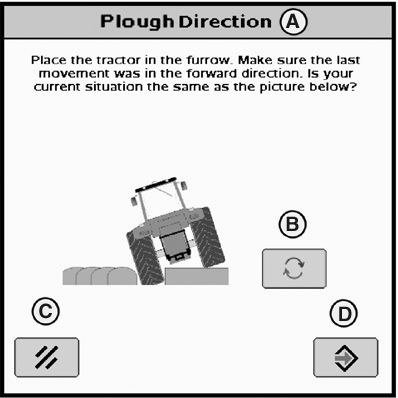
B - Toggle Button
C - Cancel Button
D - Enter Button
Plough direction (A) is displayed with the following message:
- Place the tractor in the furrow. Make sure the last movement was in the forward direction. Is your current situation the same as the picture below?
Press the Toggle button (B), if necessary, then press the Enter button (D) to confirm or press the Cancel button (C).
Sensor Calibration
 CAUTION: Ensure there are no bystanders near the implement during calibration.
Calibrate sensor contract and broaden positions as follows:
ZX1043378-UN-21NOV09Sensor Calibration - Step 1/2
ZX1043379-UN-21NOV09Sensor Calibration - Step 2/2
ZX1043381-UN-17SEP09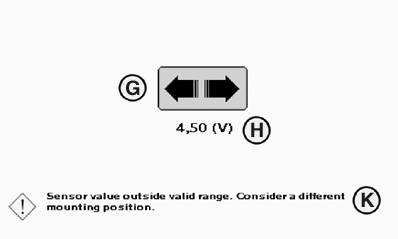
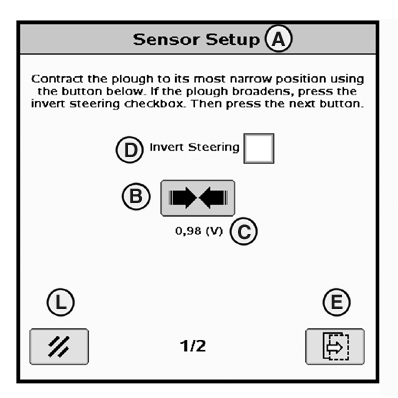
ZX1043382-UN-17SEP09A - Sensor Setup - 1/2
B - Contract Button
C - Contract Position Value (V)
D - Invert Steering Check Box
E - Next Button
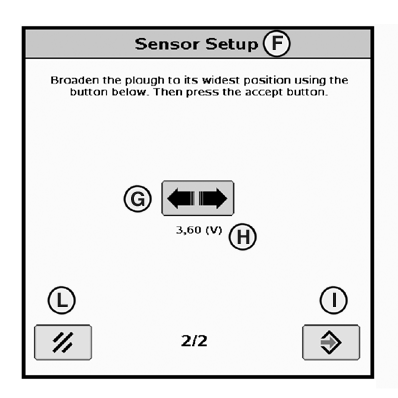
F - Sensor Setup - 2/2
G - Broaden Button
H - Broaden Position Value (V)
I - Accept Button
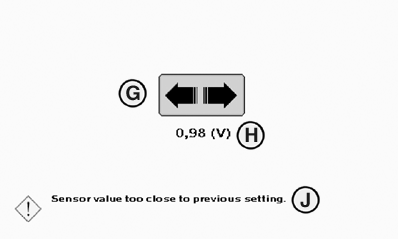
J - Alarm Message
K - Alarm Message
L - Cancel Button
Press the Calibrate button on the RUN page.
Sensor setup 1/2 (A) is displayed with the following message:
”Contract the plough to its most narrow position using the button below. If the plough broadens, press the invert steering checkbox. Then press the next button.”
Press and hold Contract button (B) until the desired voltage level (C) is reached. The limit that can be set by the operator is 0.75 V or 4.25 V depending on the sensor mounting location.
NOTE: If the plough broadens instead of contracts, check the Invert Steering box (D).
Press Next button (E) to continue sensor position calibration process.
Sensor setup 2/2 (F) is displayed with the following message:
”Broaden the plough to its widest position using the button below. Then press the accept button.”
Press and hold Broaden button (G) until the desired voltage level (H) is reached. The limit that can be set by the operator is 0.75 V or 4.25 V depending on the sensor mounting location.
NOTE: Alarm messages ”Sensor value too close to previous setting.” (J) or ”Sensor value outside valid range. Consider a different mounting position.” (K) may appear while pressing Contract or Broaden button (B, G). The difference between the voltage settings must be at least 1V. Follow message instructions then press Accept button (I).
Once calibration is finished, press Accept (I) to validate calibration.
OUCC002,0002CCF-19-20100208 |