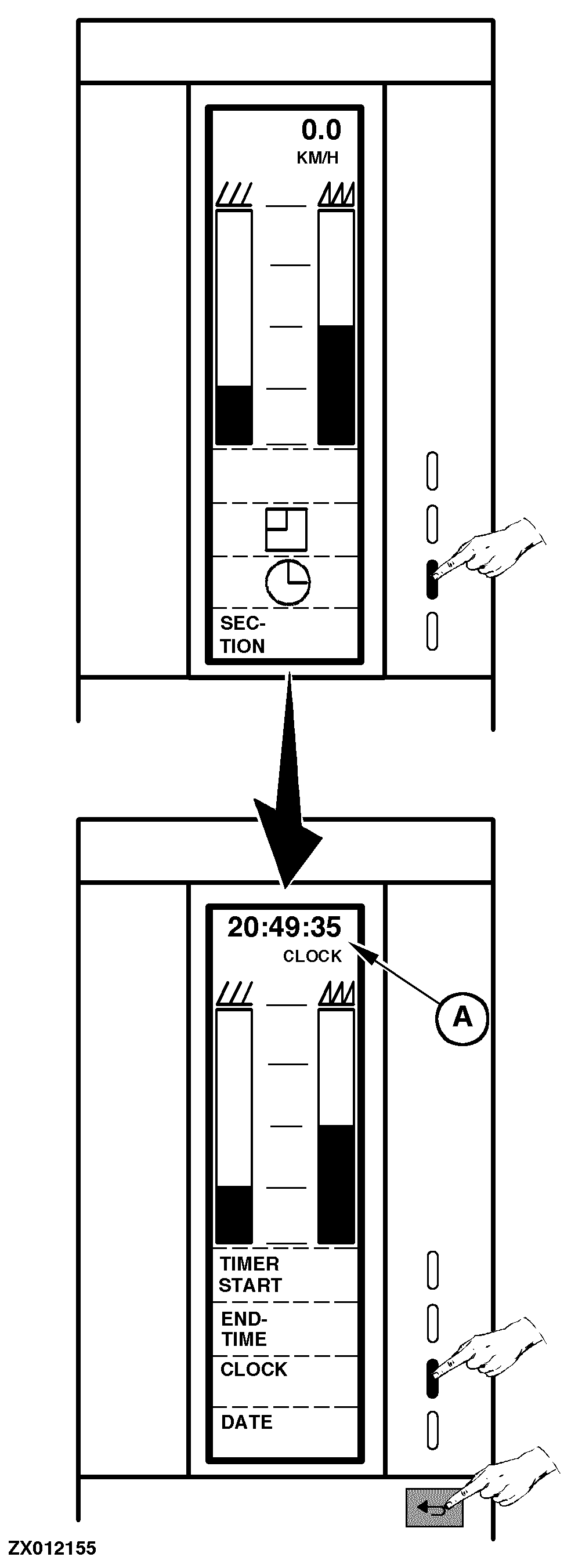
Accessing Time FunctionsAccess the time functions as follows: Switch ON monitor (see "Switching On Combine Harvester Computer" in this Section) or go to the "Main Menu", then select "Operation" function. Select "Time Function" key as shown. A new page is displayed with the following functions that can be selected by pressing the relevant function key: "TIMER START". Used to measure the time consumption for a certain job. The timer can be manually started and stopped when the function is selected. The counter can be cleared in "Data/Delete" function where there also is a total counter for time consumption (see "Deleting Data" in this Section). Value is displayed in (A). "END TIME". Displays the time when the job will be finished. The time is calculated on the basis of the present efficiency and the remaining area. It works only if "Ha Left" function has been encoded (see "Encoding Combine Harvester Computer" in this Section). Value is displayed in (A). "CLOCK". Displays in (A) the time in hours: minutes: seconds. Time is set in "Encoding Combine Harvester Computer" in this Section. "DATE". Displays in (A) the date in day: month: year. Date is set in "Encoding Combine Harvester Computer" in this Section. Press "Return" key to return to the previous function or to the main menu. |
|
ZX,OM1170009418 -19-01SEP97-1/1 |