Testing Combine Harvester Computer Components
|
|
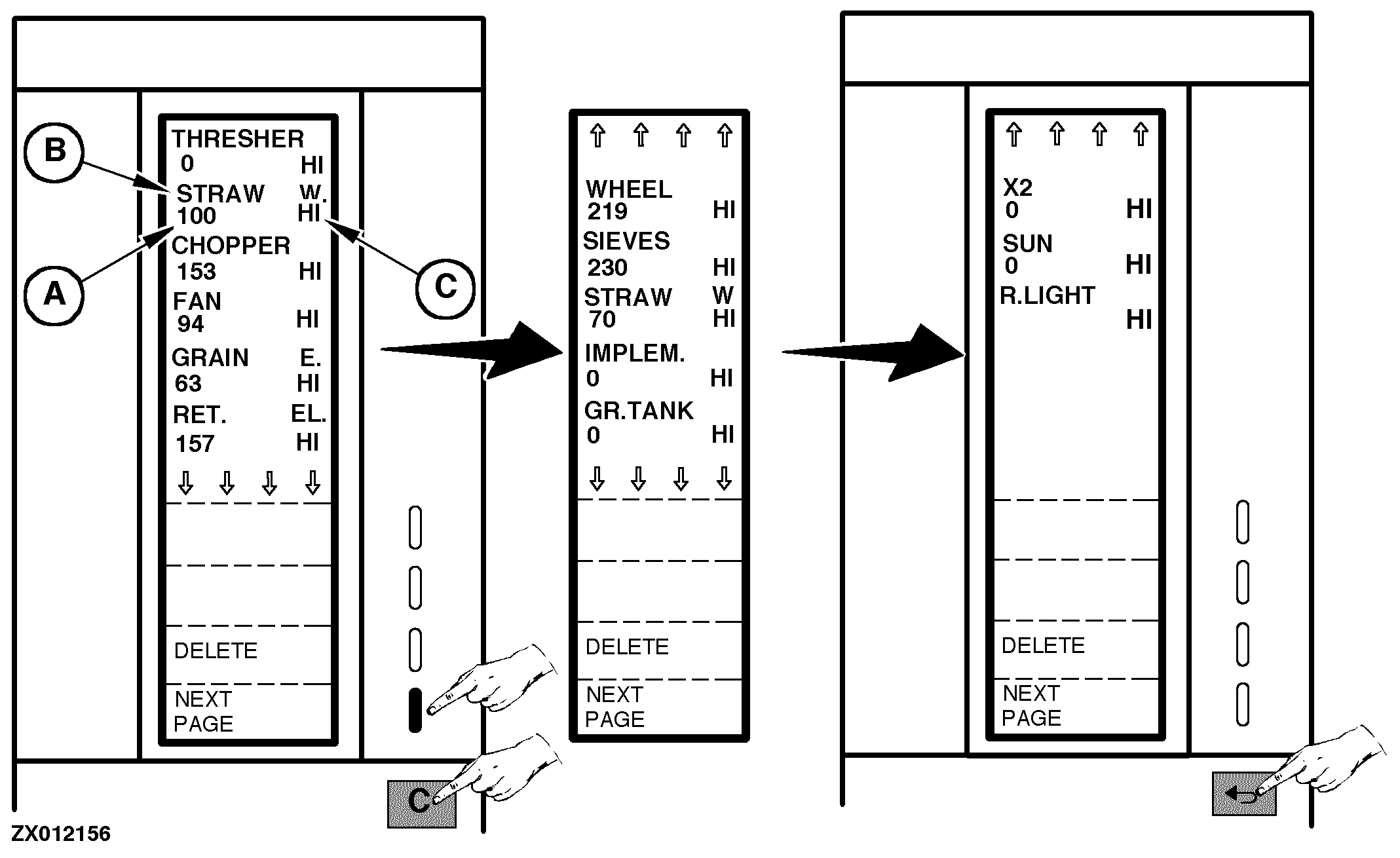
The "Test" function is used to test the shaft sending units and sensors. Proceed as follows: Switch ON monitor (see "Switching On Combine Harvester Computer" in this Section) or go to the "Main Menu", then select "Test" function. The screens above can be displayed. You can change between screen displays by pressing the "Next Page" key, as shown. For each unit a counter shows how many times the sending unit has been activated. This counter (A) is to left of the display under each sending unit (B). NOTE: The counter can count up to 255 pulses. After this it will restart from 0. |
To the right of the counter, display (C) indicates whether the sending unit is active (LO) or not (HI). "LO" means that the magnet is detected by the sensor. NOTE: Display (C) can be used for sending unit adjustment. See relevant sending unit adjustment in "Service-Electrical System" Section. "X2" and "R.LIGHT" are not used. The beacon light rotation is not controlled by the Combine Harvester Computer. Press "Delete" key if all counters require to be cleared. Press "Return" key to return to the previous function or to the main menu. |
ZX,OM1170009419 -19-01SEP97-1/1 |