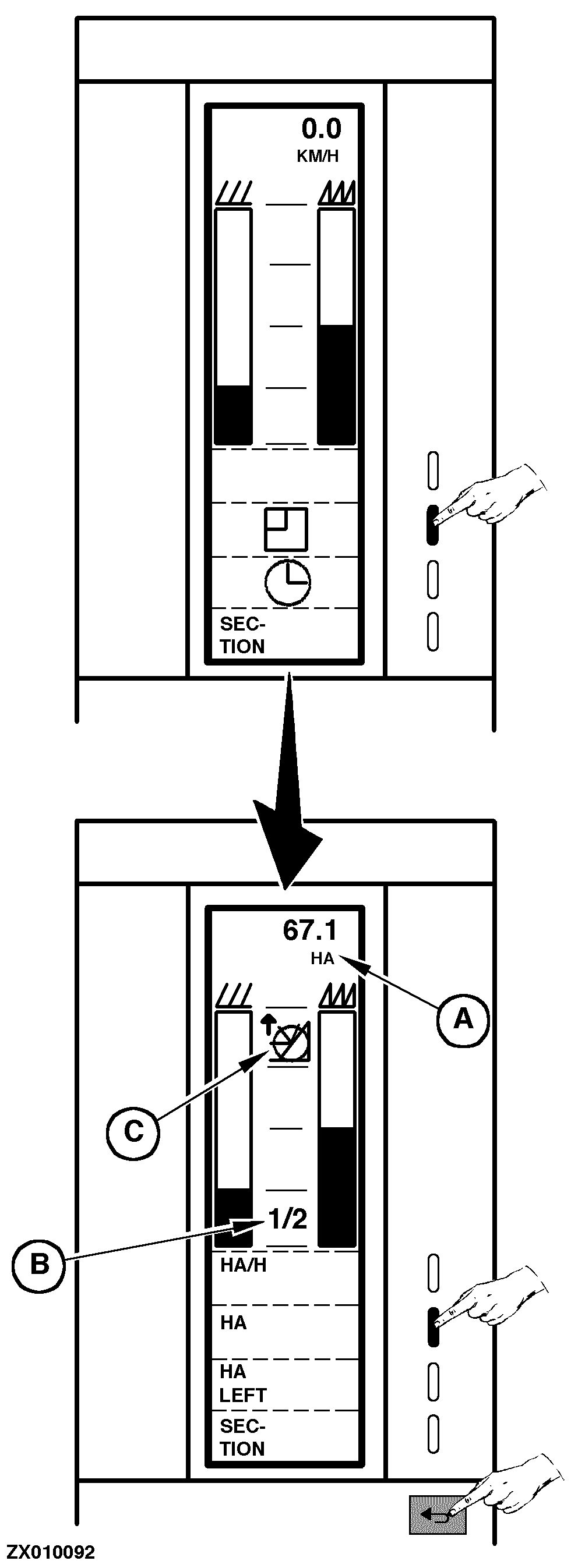
Accessing Area FunctionsThis function allows display of different area counters for performance control. Access the "Area Functions" as follows: Switch ON monitor (see "Switching On Combine Harvester Computer" in this Section) or go to the "Main Menu", then select "Operation" function. Select "Area Function" key as shown. A new page is displayed with the following functions that can be selected by pressing the relevant function key: "HA/H". Efficiency: The size of the area worked per hour with the present ground speed. Value is displayed in (A). "HA". Area counter. The size of the area worked since the counter was cleared. The counter can be cleared in the "Data/Delete" function where there is a total counter for area (see "Deleting Data" in this Section). Value is displayed in (A). "HA LEFT". The remaining area can be read here if before field operation the size of the field has been encoded (see "Encoding Combine Harvester Computer" in this Section). Value is displayed in (A). "SECTION". Each time this key is pressed the harvest width is reduced by 1/4, regardless of the encoded working width (see "Adjusting Working Width" in this Section). Value is displayed in (B). NOTE: The section reduction will affect the area counting and the grain loss calculation. Each time the header is raised, pictogram (C) is displayed and the harvest width will automatically be changed into full width. Press "Return" key to return to the previous function or to the main menu. |
|
ZX,OMSLC007298 -19-22NOV96-1/1 |