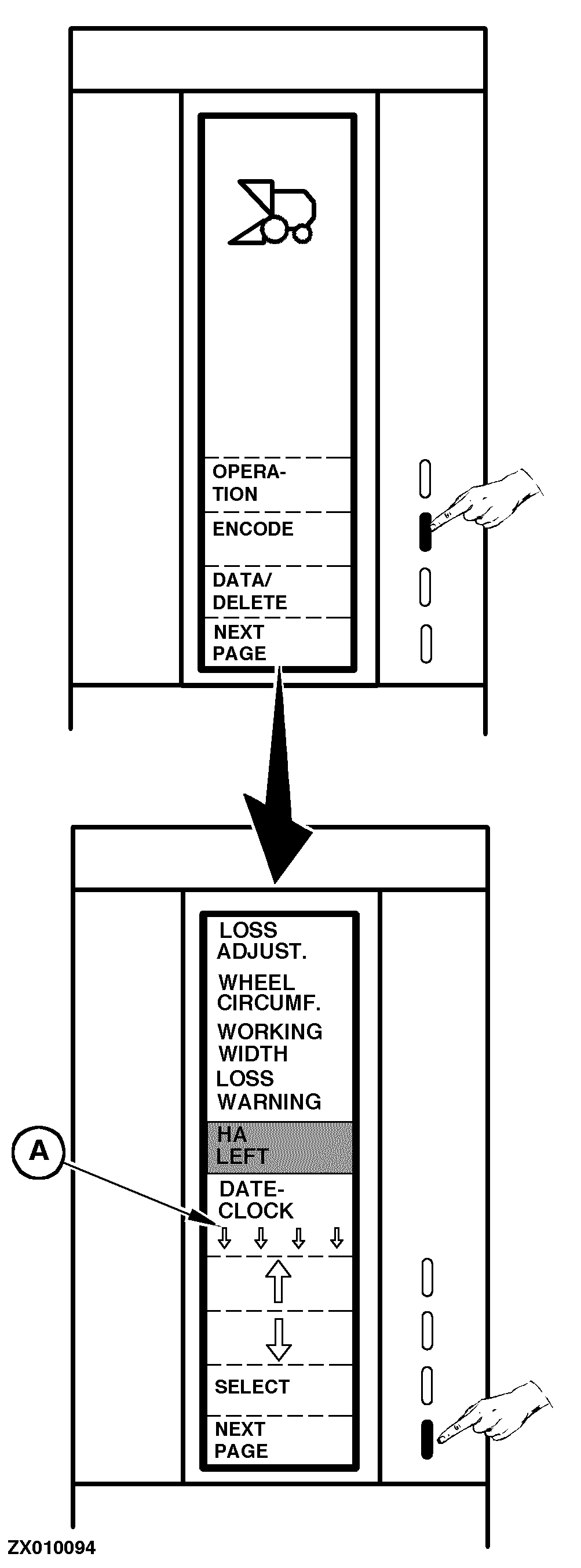
Encoding Combine Harvester ComputerThis function must be selected to encode (adjust) grain loss level, set stop warnings and adjust working width or for other settings. Proceed as follows: Switch ON monitor (see "Switching On Combine Harvester Computer" in this Section) or go to the "Main Menu", then select "Encode" function. A first page is then displayed with the following functions: NOTE: The small arrows (A) indicate that another page is available. Press "Next Page" key to display it. "LOSS ADJUST." To adjust grain loss to a correct level (see "Adjusting Grain Loss Level" in this Section). "WHEEL CIRCUMF.". To adjust the effective wheel circumference where the sending unit is mounted (see "Adjusting Wheel Circumference" in this Section). "WORKING WIDTH". To adjust effective cutterbar working width (see "Adjusting Working Width" in this Section). "LOSS WARNING". To activate or deactivate the sound alarm of grain loss warning (see "Adjusting Loss Warning" in this Section). "HA LEFT". To adjust the size of the field before starting combine field operation (see "Adjusting Field Size" in this Section). "DATE CLOCK". To set date or time data (see "Adjusting Date/Clock" in this Section). Press the "Arrow" keys to displace the cursor (the dark bar) up or down to the desired function, then press "Select" key to activate it. Press "Next Page" key to access the second page where stop warnings can be encoded. |
|
ZX,OMSLC007300 -19-22NOV96-1/3 |
|
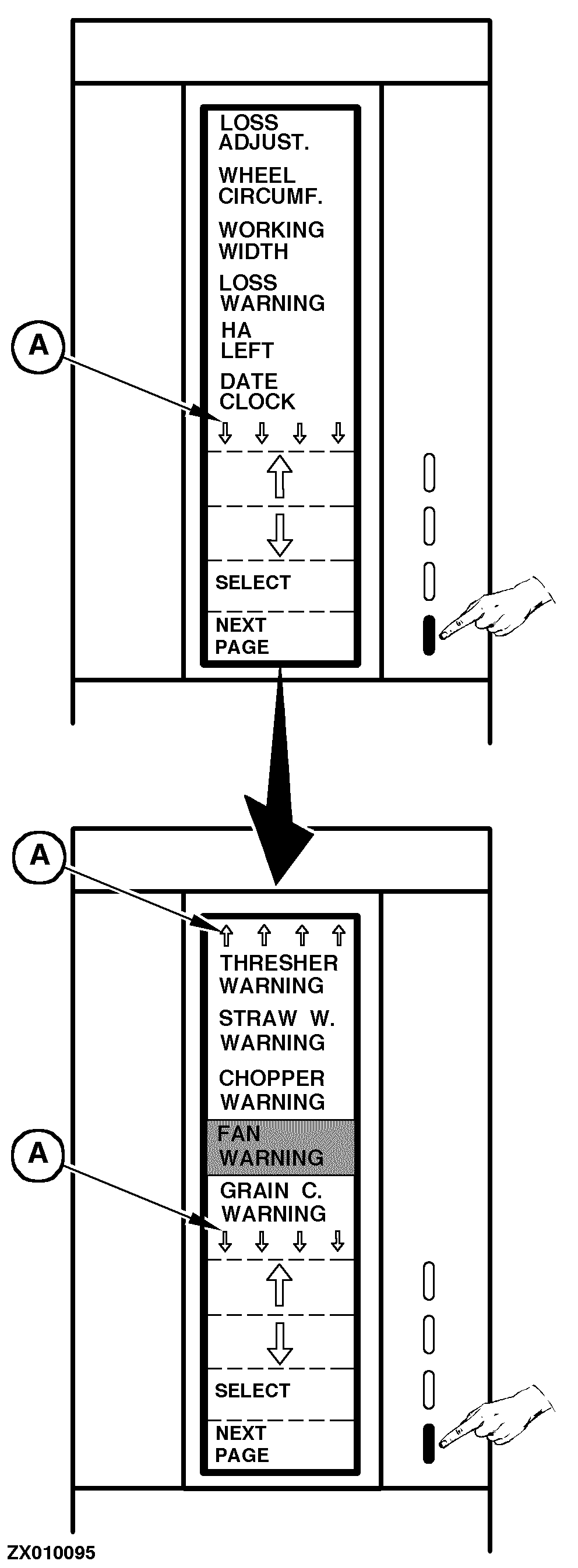
The second page is then displayed with the following functions: NOTE: The small arrows (A) indicate that another page is available. Press "Next Page" key to display it. "THRESHER WARNING". The Combine Harvester Computer is not connected to the threshing cylinder shaft speed sending unit of the combine. Do not select this function. "STRAW W. WARNING". To adjust the minimum straw walker shaft RPM under which the alarm should be activated. "CHOPPER WARNING". To adjust the minimum straw chopper shaft RPM under which the alarm should be activated. "FAN WARNING". To adjust the minimum fan shaft RPM under which the alarm should be activated. "GRAIN C. WARNING". To adjust the minimum grain elevator shaft RPM under which the alarm should be activated. Press the "Arrow" keys to displace the cursor (the dark bar) up or down to the desired function, then press "Select" key to activate it. See "Encoding Stop Warnings" in this Section to encode minimum RPM values of all shafts mentioned above. Press "Next Page" key to access to the third and last page where stop warnings can be encoded. |
|
ZX,OMSLC007300 -19-22NOV96-2/3 |
|
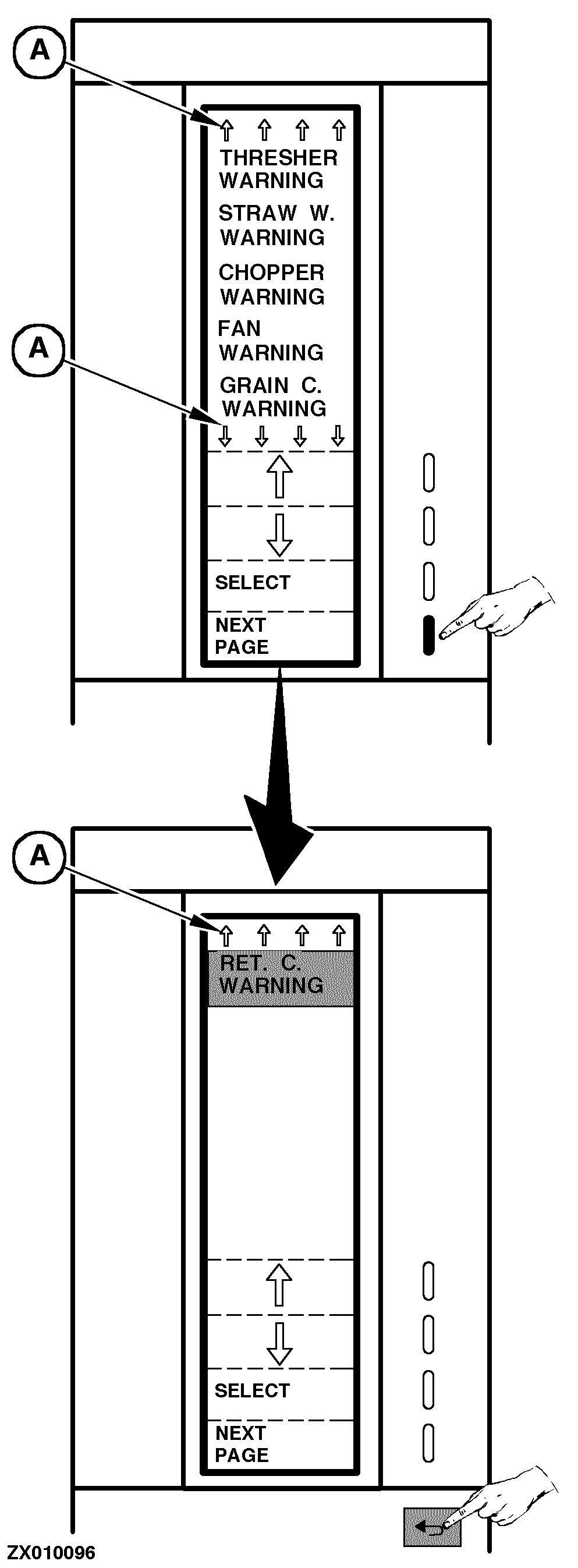
The last page is then displayed with the following function: NOTE: The small arrows (A) indicate that another page is available. Press "Next Page" key to go back to the first page. "RET C. WARNING". To adjust the minimum tailings elevator shaft RPM under which the alarm should be activated. Press "Select" key to activate it. See "Encoding Stop Warnings" in this Section to encode minimum RPM value of the shaft mentioned above. Press "Return" key to return to the previous function or to the main menu. |
|
ZX,OMSLC007300 -19-22NOV96-3/3 |