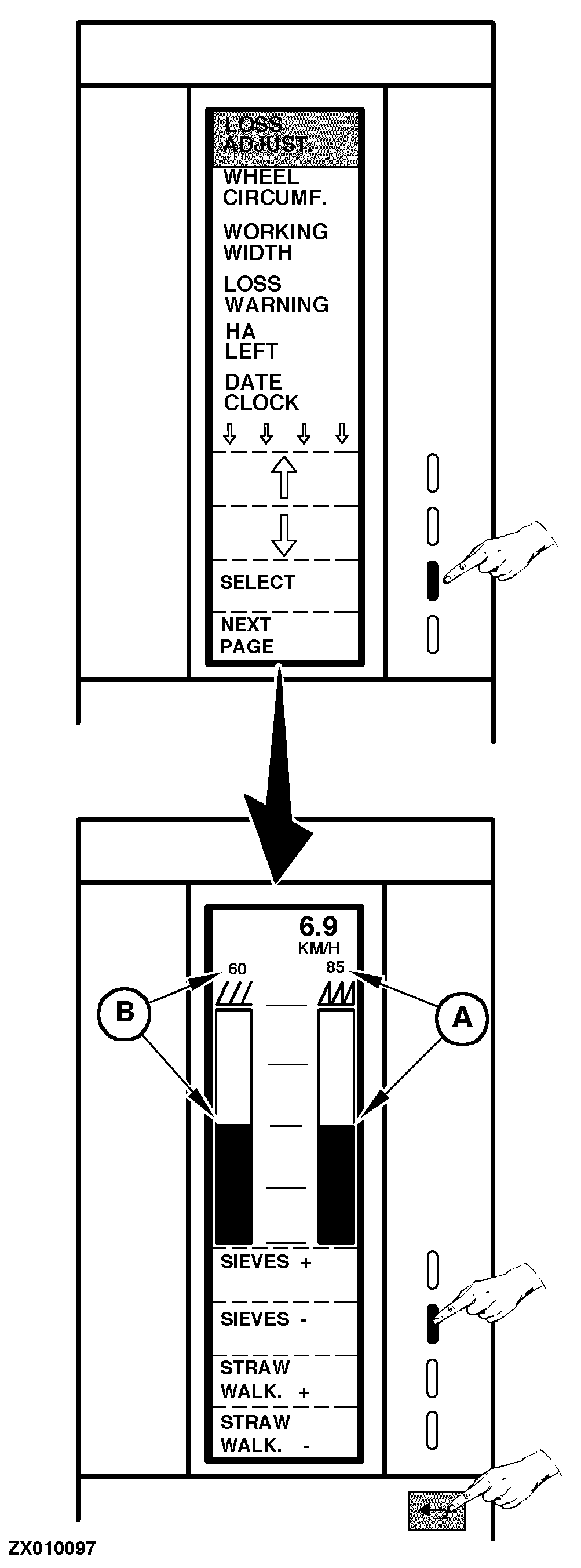
Adjusting Grain Loss LevelThis function must be selected to adjust the grain loss to a correct level (50% of max. deflection). This adjustment must be made while driving. First a normal adjustment of the combine is made. When the maximum ground speed with an acceptable grain loss level has been reached, the reading is set at this speed by using the "Sieves" and "Straw Walk." function keys. Proceed as follows: Switch ON monitor (see "Switching On Combine Harvester Computer" in this Section) or go to the "Main Menu", then select "Encode" function. Select the "Loss Adjust." function, as shown. A new page is displayed: Showing straw walker and sieve bar graph counters (A) and (B) so that you can write down the basic setting for each crop type. This will ease the setting when changing from one crop to another. NOTE: Setting should be checked in connection with any crop type. Press the desired function key to set the counters until bar graphs are at the middle of their course, as shown. The basic adjustment of the Combine harvester Computer is now in line with the grain loss adjustment of the combine. During combine operation, bar graphs will then react in the same way as the grain loss and alert the operator when they become too high if loss warning is activated (see "Encoding Stop Warnings" in this Section). Press "Return" key to return to the previous function or to the main menu. |
|
ZX,OMSLC007303 -19-25NOV96-1/1 |