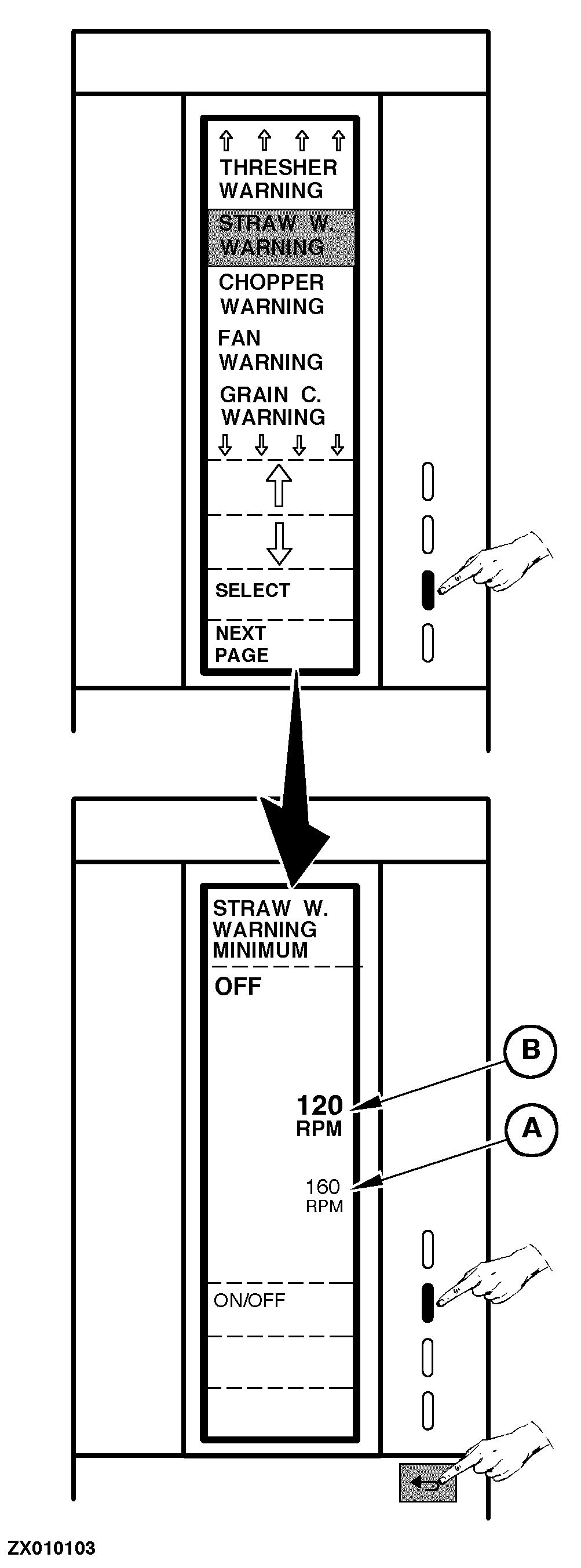
Encoding Stop WarningsHere you can choose whether the shaft sending units shall be ON or OFF. If you want to control the revolutions, the accepted minimum RPM for the shaft must be encoded. The procedure is the same for all stop warnings described in "Encoding Combine Harvester Computer". The warning is given by a sound alarm and a warning pictogram showing which shaft is causing the warning and the RPM of the shaft (not illustrated). The warning pictogram stays on until the revolutions are over the warning limit. In case the warning is not serious and does not require a stop, the warning can be stopped by pressing the "Return" key. IMPORTANT: By pressing the "Return" key to stop the warning, the shaft is no longer controlled. There will be no further warnings before the revolutions have been over the warning limit again or the computer has been switched OFF. Proceed as follows: Switch ON monitor (see "Switching On Combine Harvester Computer" in this Section) or go to the "Main Menu", then select "Encode" function. Select the desired stop warning to be set as described in "Encoding Combine Harvester Computer". A new page is displayed: The present RPM appears in (A) as a help in connection with the value encoded in (B). |
|
ZX,OMSLC007309 -19-25NOV96-1/2 |
|
Use numeric keys to enter new value (B) as follows: Straw Walker Alarm: Value (B) should be 3/4 of the max. straw walker speed. Chopper, Fan, Grain Elevator and Tailings Elevator Alarms: Value (B) should be 25% less than the present shaft speed displayed in (A). Press "On/Off" function key to activate or deactivate stop warning, as shown. Press "Return" key to return to the previous function or to the main menu. |
|
ZX,OMSLC007309 -19-25NOV96-2/2 |