Adjusting Cutterbar PositionExtended Position
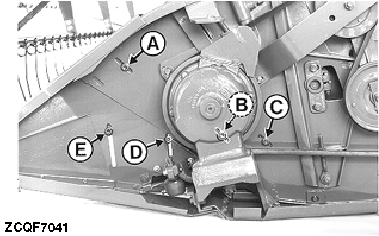
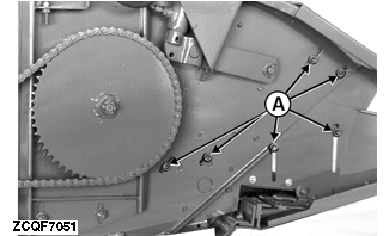
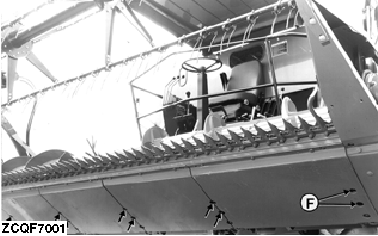
2. Loosen bolts (D) and (E). 3. Remove the belt from the pulley on the cutterbar drive housing. 4. Remove bolts (F) along the bottom of the header. 5. Lower the header to the ground. Slowly reverse the combine and position the cutterbar as desired. 6. Replace bolts (F) and the bolt covers. 7. Retighten bolts (D) and (E). 8. Reinsert and tighten bolts (A) and (B). Save bolt (C) for future use. 9. Reinstall the belt. Intermediate PositionIMPORTANT: Follow the same procedure as for the extended position to set the intermediate position. |
|
 CAUTION:
Always attach the cutting platform cylinder safety lockouts prior to making any adjustment under the cutting platform.
CAUTION:
Always attach the cutting platform cylinder safety lockouts prior to making any adjustment under the cutting platform.
ZX,OMSLC007541 -19-28DEC96-1/2 |
|
Retracted Position
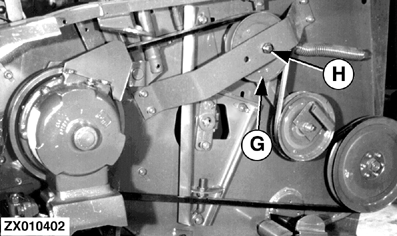
1. Remove bolts (A), (B), (C) and (D), on both sides of the header. 2. Loosen bolt (E). 3. Remove bolts (F) along the bottom of the header. 4. Lower the header to the ground and drive the combine forward to position the cutterbar in the desired location. 5. If the cutterbar cannot be easily retracted, raise the header completely. Lower the safety lockouts. Have a person stand at each crop divider and move the dividers up and down until the cutterbar is in the desired location. 6. Reinstall and tighten bolts (F) and the covers. Save the extra bolts (F) for future use. 7. Retighten bolt (E). 8. Reinstall and tighten bolts (A) and (C). Save bolts (B) and (D) for future use. NOTE: Install pulley (G) in opening (H) to adjust the cutterbar drive belt. See "Service-Drives and Shields" Section.
|
|
ZX,OMSLC007541 -19-28DEC96-2/2 |