How The VISIONTRAK™ Performance Monitor Works
|
|
|
|
|
|
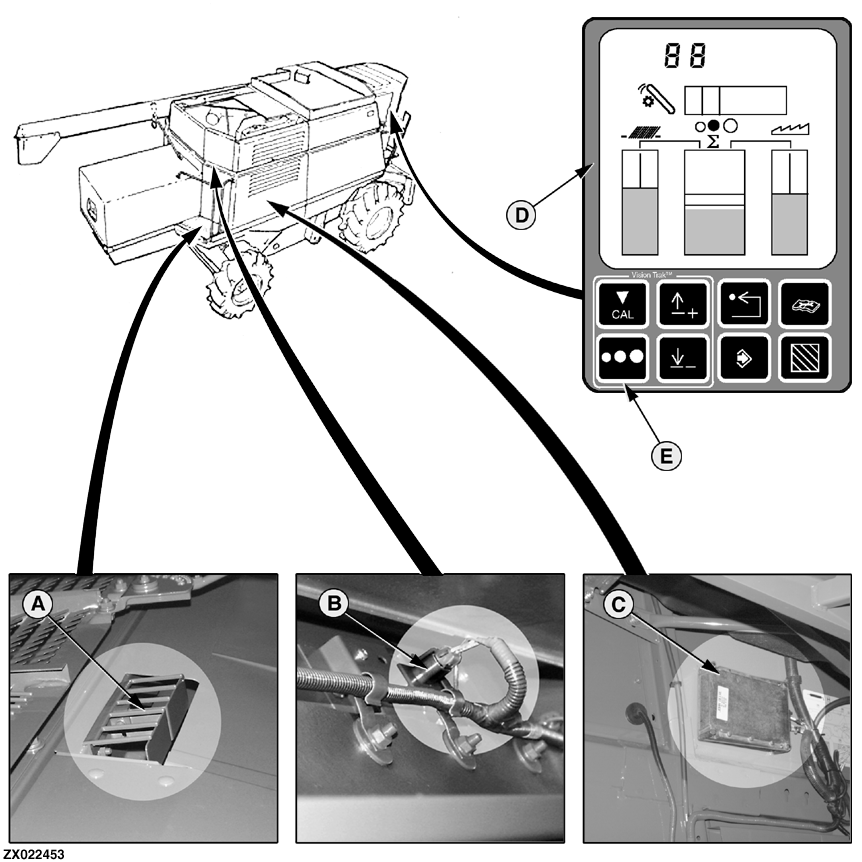
Grain seeds striking the VisionTrak™ sensors (A) and (B) create a small electrical signal. These signals are routed to the right control unit (C) for analysis. The right control unit filters out noise developed from other |
materials striking the sensors, measures the seed strikes, and sends CAN Bus messages to the VisionTrak™ performance monitor (D). |
OUZXMAG,0000781 -19-06SEP00-1/2 |
|
The VisionTrak™ performance monitor displays the loss level with a bar graph for each sensor and another bar graph for a summation of the sensor signals. The system can be set to two modes. The standard mode averages the shoe sensors and averages the separator sensors. The optional mode shows the activity of each individual sensor. These activity indicators will not change sensitivity with a change in the VisionTrak™ system calibration. The seed size may be selected by pushing the seed size switch (E). It will change size to show the selected seed size. How to set standard mode or optional mode, see "Machine Setting Procedure" in "Calibration Procedures" Section. VisionTrak™ System Check1. To check the operation of the system, set grain size to small and enter the diagnostic mode. Go to |
Control Unit Number E02 and Diagnostic Address 030. How to get access to the Control Unit Number E02 and Diagnostic Addresses see "Machine Setting Procedure" in "Calibration Procedures" Section.
2. Tap on the right shoe sensor with a small screwdriver or steel scale. The number shown indicates strikes read by the system. 3. While remaining in the diagnostic mode (Control Unit Number E02), go to address 031 for the left shoe sensor, 032 for the right separator sensor and 033 for the left separator sensor, repeating the tap test at each sensor. VisionTrak™ response can be modified. |
OUZXMAG,0000781 -19-06SEP00-2/2 |