Activating Automatic Knife Sharpening
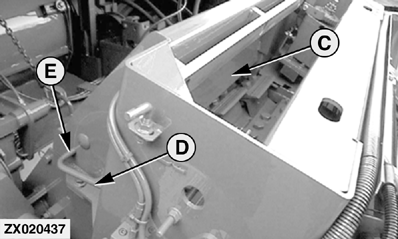
IMPORTANT: Make sure cutterhead can turn freely. Before starting sharpening procedure: Fully raise rotor guard (C) by sliding lever (D) rearward until it engages in its locking position (E). The two front shift rods on length-of-cut transmission must be in neutral position. Reverser switch for manual knife sharpening must be in "Off" position. If a kernel processor or power chute is installed, drive belt must be locked (put out of operation). See Section "Kernel Processor" or "Power Chute". Start engine and run at maximum speed.
|
|
 CAUTION:
Before servicing or adjusting the harvester, always disengage all drives and shut off engine. After disengaging drives, fan and cutterhead may continue rotating for a few minutes. To avoid injuries, do not open or remove any covers or guards until all moving parts have stopped.
CAUTION:
Before servicing or adjusting the harvester, always disengage all drives and shut off engine. After disengaging drives, fan and cutterhead may continue rotating for a few minutes. To avoid injuries, do not open or remove any covers or guards until all moving parts have stopped.
OUZXMAY,00002DB -19-09SEP00-1/2 |
|
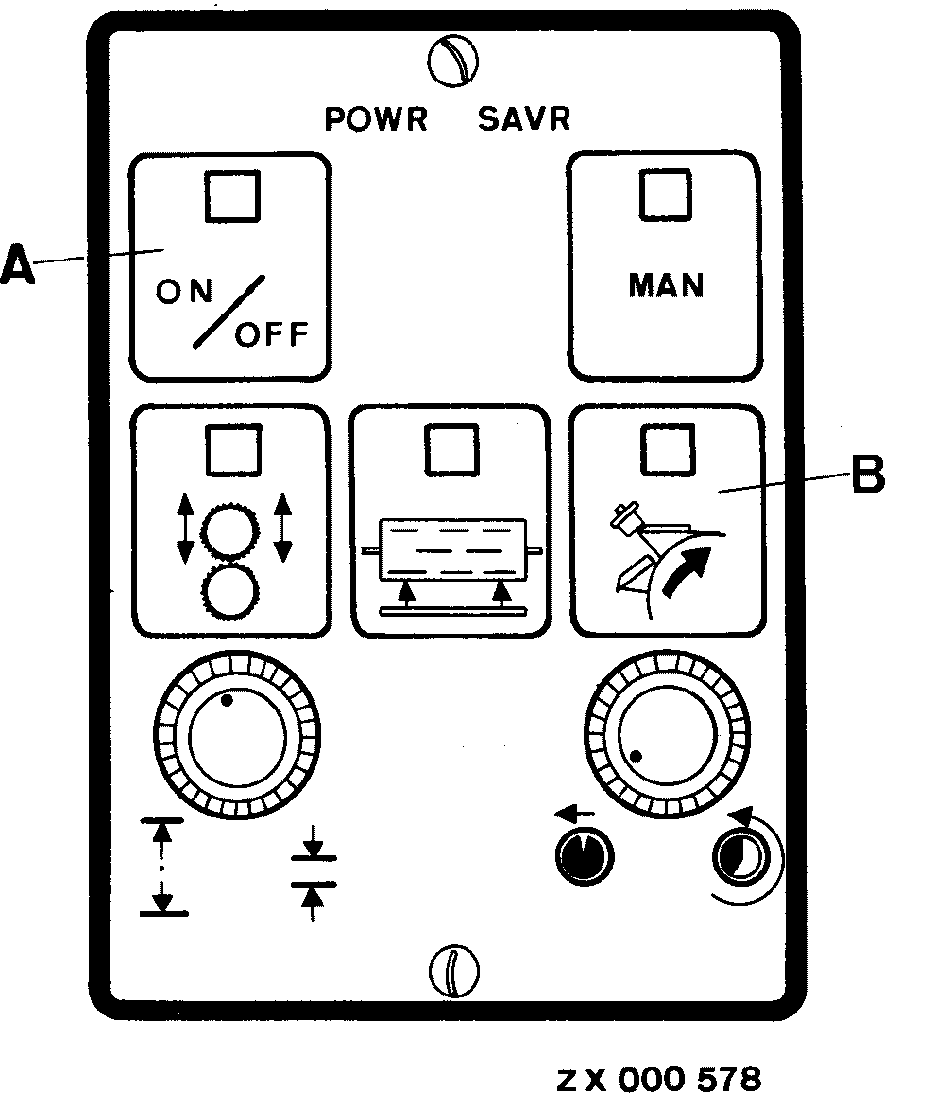
NOTE: By pressing key (B) the number of sharpening cycles adjusted at INFO-TRAK ™ monitor can be checked. Starting sharpening procedure First press key (A) and then key (B). Both key indicator lights will glow. Sharpening procedure will now be carried out automatically Cutterhead is reversed. The sharpening stone performs the sharpening cycles adjusted previously on the INFO-TRAK ™ monitor. After completion of the automatic sharpening process, the sharpening stone will move back to l.h. position. Knife sharpening operation is switched off automatically and all indicator lights will go out. Any time the sharpening procedure can be stopped by pressing key (A); the sharpening stone automatically returns to its home position, the cutterhead stops revolving and key (A) indicator light will go out. Indicator light of MAN key will go out as soon as the sharpening stone has returned to home position. NOTE: Now it is possible to activate automatic stationary knife adjustment. Refer to "Automatic Stationary Knife Adjustment" in this Section. If an operating error or a malfunction occurs during the knife sharpening process, indicator light of key (B) will flash and the INFO-TRAK ™ monitor will display a service code. IMPORTANT: Automatic knife sharpening may be stopped by pressing STOP key on multi-function lever. In this case, the stone must be manually raised (slightly) by turning the ratchet clockwise prior to re-activating automatic sharpening process. |
|
|
INFO-TRAK is a trademark of Deere & Company. | OUZXMAY,00002DB -19-09SEP00-2/2 |