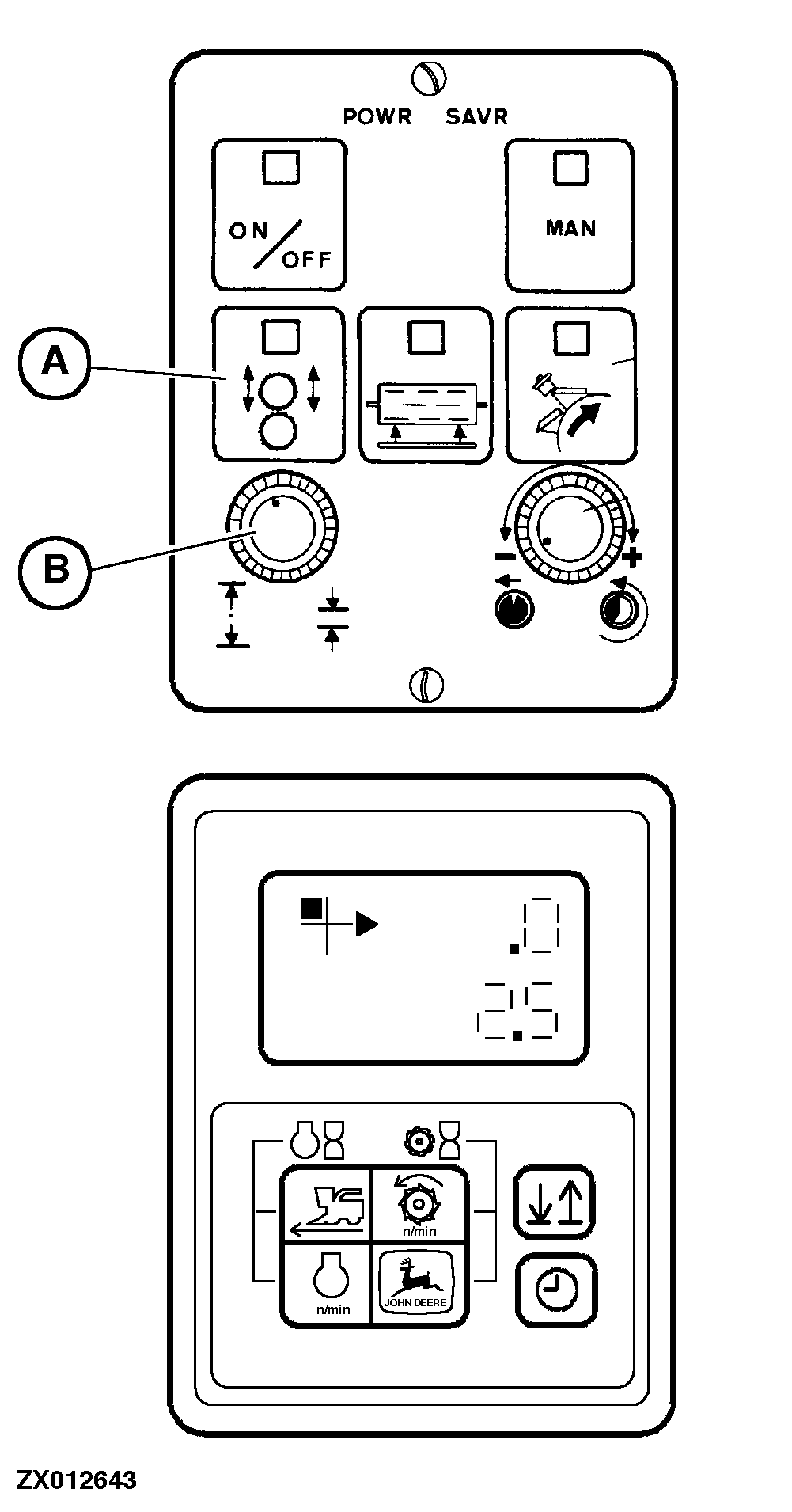
Adjusting Kernel Processor Roll Clearance On INFO-TRAK™ MonitorTurn on ignition before adjusting roll clearance on INFO-TRAK ™ monitor. Press key (A). The INFO-TRAK ™ monitor display will correspond to position of knob (B). NOTE: The INFO-TRAK ™ monitor will only display the actual roll clearance if knob position has not been changed since the last adjustment procedure (clearance displayed on INFO-TRAK ™ monitor must not necessarily be identical with actual roll clearance). Display for km/h Monitor display starts with 1.0 mm (0.04 in.) (factory adjustment) and increases in 0.5 mm (0.02 in.) increments. Display for mph Monitor display starts with 1 (factory adjustment) and increases in increments up to 100 .
Adjust desired roll clearance by pressing key (A) and simultaneously turning knob (B). Turn knob to the right to reduce clearance setting; turn knob to the left to increase clearance setting. |
|
|
INFO-TRAK is a trademark of Deere & Company. | OUZXMAY,0000333 -19-28OCT00-1/1 |