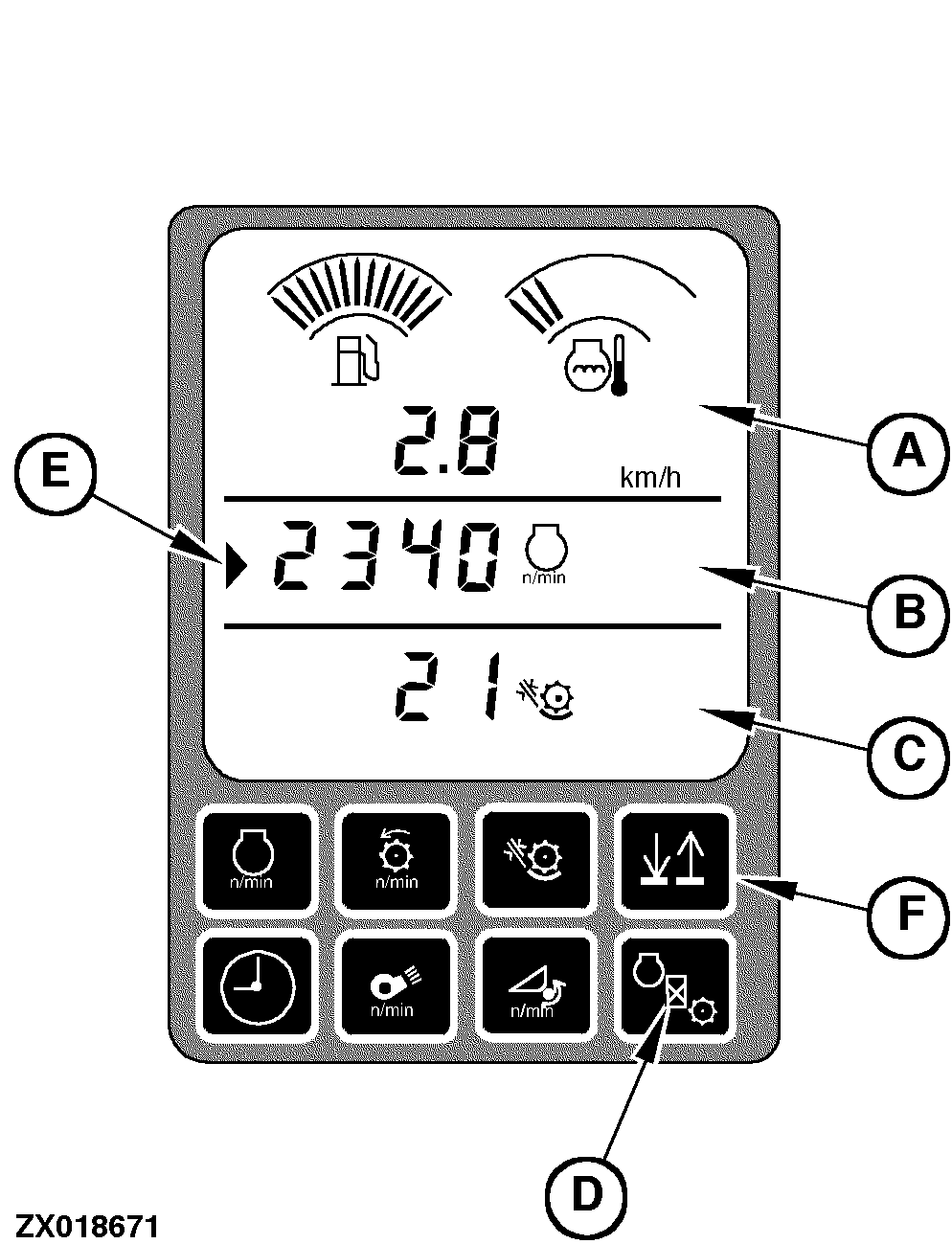
Digital Display LinesAt power up, along with the appropriate symbol the upper line (A) will display the ground speed (km/h or MPH) or total area (ha for hectares or A for acres) when the area counter switch is pressed. Field Total Area Counter is shown on the middle line of the display. Field Area Counter is shown on the lower line of the display. The middle line (B) and lower line (C) can display the same data. The operator can select any of the following data to be displayed on either line (middle or lower) of the display.
To display engine and separator hours, press the hour switch (D). The engine or separator hours along with the appropriate symbol will be displayed on the middle line. The hours will remain displayed for ten seconds or until another switch is pressed which will return the display to its previous mode. The middle and lower display will always show the last information displayed when the key was turned off. Either the middle line or the lower line of the display can be changed by the operator to display any data of his choice. The line that is currently active to change, will be shown by an indicator arrow (E) at the left side of the digital display. The appropriate arrow will be displayed when the operator pushes the up/down arrow key (F). Pressing the concave clearance, cleaning fan speed or the cylinder speed switches on the armrest will cause the digital display to display that function for 10 seconds after the function switch is released. |
|
OUO6075,0000345 -19-08JAN01-1/1 |