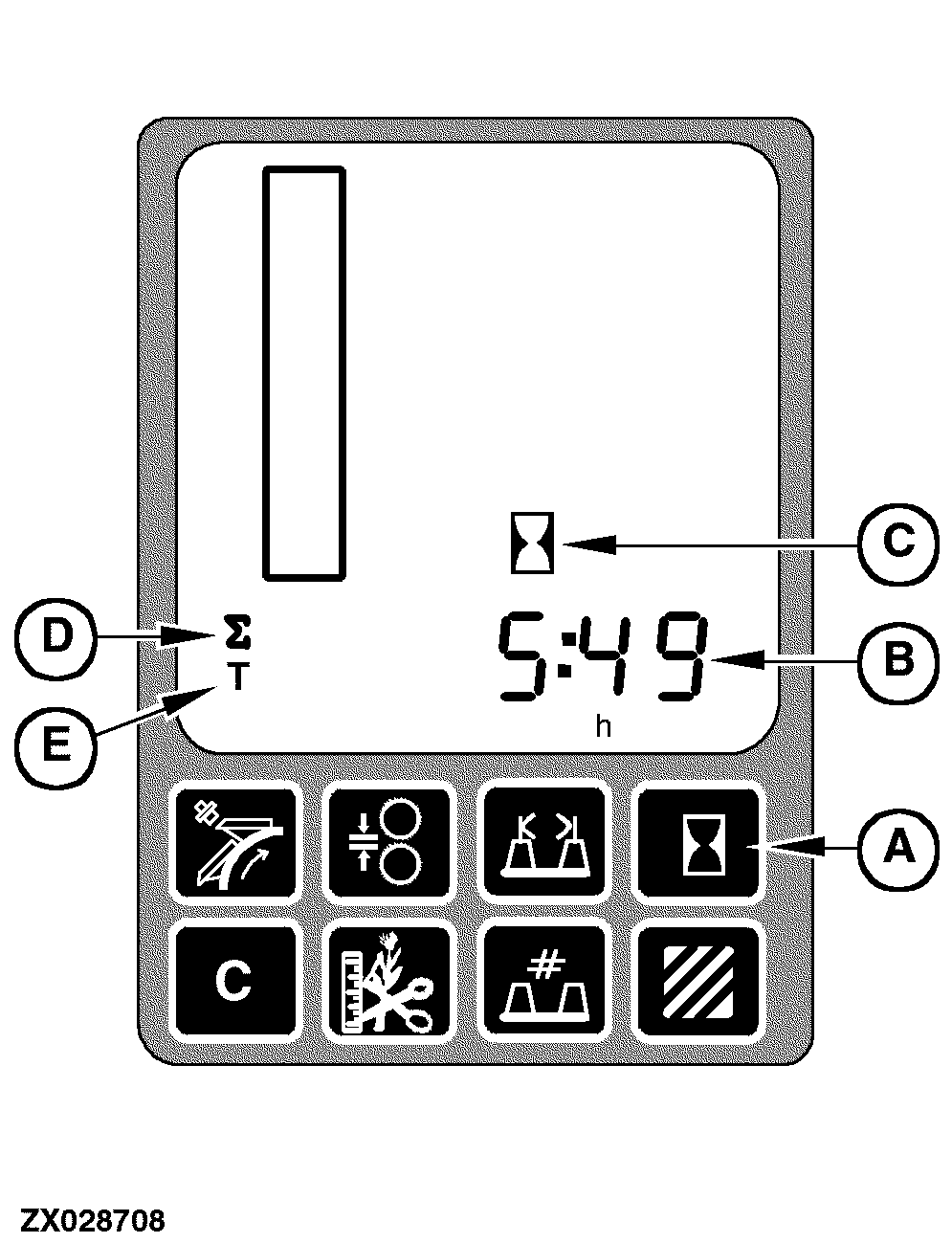
Operating Hours SwitchTo display cutterhead operating hours per field or cutterhead operating hours per day, press the operating hours switch (A). The first time that this switch is pressed, the cutterhead operating hours per field value will be displayed on the digital display line (B) along with the hour units (h) and the operating hour icon (C) will also be displayed. Pressing the switch for the second time will result in the cutterhead operating hours per day value being displayed. This will be evident by the fact that the summation symbol (D) and hour units are displayed. This value can be reset at any time according to the requirements. Pressing the switch for the third time will result in the total cutterhead operating hours value being displayed. This will be evident by the fact that the total symbol (E) and hour units are displayed. The total cutterhead operating hours cannot be reset. Pressing the switch for the fourth time will turn off the cutterhead operating hours display. When the cutterhead operating display is turned off, the digital display line (B) will no longer display cutterhead operating hours, and the associated icons will no longer be displayed. The default display format for cutterhead operating hours is HHHH:MM. |
|
OUZXMAY,00003CE -19-13MAY02-1/1 |