
Introduction
Product Identification
Safety
Operating
Replacement Parts
Service Intervals
Service Lubrication
Service Engine
Service Transmission
Service Mower
Service Electrical
Checking Battery Electrolyte Level
Removing and Installing Battery
Cleaning Battery and Terminals
Replacing Indicator Light Bulb
Service Miscellaneous
Troubleshooting
Storage
Assembly
Specifications
Warranty
John Deere Quality Statement
Service Record

Service Electrical
Battery Statement
Checking Battery Electrolyte Level
1. Park machine safely. (See Parking Safely in Safety section.)
3. Remove manifold caps on top of battery.
IMPORTANT: Avoid damage! Acid may leak from battery while it is charging. Make sure battery is filled correctly. |
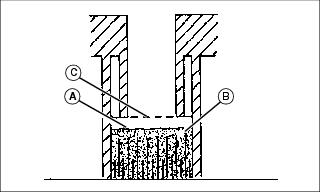
4. Check electrolyte level. Electrolyte level (A) should be 6 mm (1/4 in.) above plates (B) and below filler neck (C).
5. Add distilled water if necessary.
7. Check battery cable hardware and tighten if necessary.
Removing and Installing Battery
 c CAUTION: Avoid injury! Battery produces a flammable and explosive gas. Battery may explode:
· Wear eye protection and gloves. · Do not allow direct metal contact across battery posts. |
Removing
1. Park machine safely. (See Parking Safely in Safety section.)
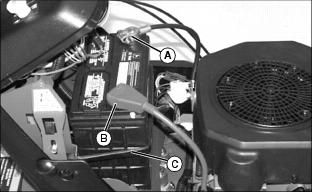
3. Disconnect negative (-) battery cable (A).
4. Push red cover (B) away from positive (+) battery terminal and remove cable from battery.
Installing
IMPORTANT: Avoid damage! Follow instructions carefully. Battery and battery cables must be installed correctly. When installing battery, make sure battery posts are facing toward front of machine. |
1. Place battery on battery tray so battery posts are facing toward front of machine.
2. Connect positive (+) battery cable.
3. Connect negative (-) battery cable.
4. Apply general-purpose grease, petroleum jelly or silicone spray to terminals to help prevent corrosion.
5. Slide red cover over positive battery terminal.
6. Secure black rubber strap (C).
Cleaning Battery and Terminals
|
c CAUTION: Avoid injury! Battery produces a flammable and explosive gas. Battery may explode:
· Wear eye protection and gloves. · Do not allow direct metal contact across battery posts. |
1. Park machine safely. (See Parking Safely in Safety section.)
3. Wash battery with solution of four tablespoons of baking soda to one gallon of water. Be careful not to get baking soda solution into cells.
4. Rinse battery with plain water and dry.
5. Clean terminals and battery cable ends with wire brush until bright.
6. Apply petroleum jelly or silicone spray to terminal to prevent corrosion.
Using Booster Battery

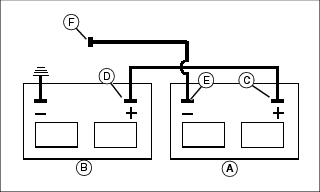
1. Connect positive (+) booster cable to booster battery (A) positive (+) post (C).
2. Connect other end of positive (+) booster cable to disabled machine battery (B) positive (+) post (D).
3. Connect negative (-) booster cable to booster battery negative (-) post (E).
4. Connect other end (F) of negative (-) booster cable to a metal part of disabled machine frame away from battery.
5. Start engine of disabled machine and run machine for several minutes.
6. Carefully disconnect booster cables in exact reverse order: negative cable first and then positive cable.
Replacing Fuses
1. Park machine safely. (See Parking Safely in Safety section.)
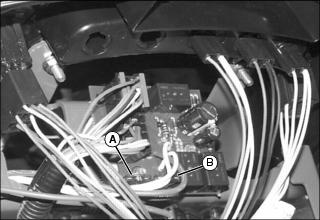
3. Pull defective starter fuse (A) or headlight fuse (B) out of socket.
4. Check metal clip in fuse window and discard fuse if clip is broken.
5. Push new 15 Amp fuse into socket.
Replacing Headlight Bulb
1. Park machine safely. (See Parking Safely in Safety section.)
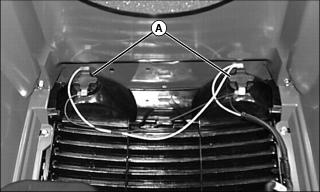
3. Turn bulb socket (A) 1/4 turn counterclockwise to remove socket from headlight housing.
4. Push bulb down and rotate 1/8 turn counterclockwise to remove bulb from socket.
5. Replace defective bulb with new bulb.
6. Insert bulb socket into housing, push in and rotate 1/4 turn clockwise to install.
Replacing Indicator Light Bulb
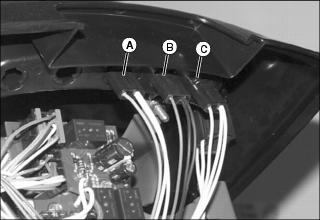
1. Rotate indicator bulb socket 1/8 turn counterclockwise to remove:
· Battery discharge light (B).
· Oil pressure indicator light (C).
4. Install socket into holder and rotate 1/8 turn clockwise to secure.