
Introduction
Product Identification
Safety
Operating
Replacement Parts
Service Intervals
Service Lubrication
Service Engine
Engine Warranty Maintenance Statement
Changing Engine Oil and Filter
Cleaning Air Intake Screen and Engine Fins
Service Transmission
Service Mower
Service Electrical
Service Miscellaneous
Troubleshooting
Storage
Assembly
Specifications
Warranty
John Deere Quality Statement
Service Record

Service Engine
Engine Warranty Maintenance Statement
Maintenance, repair, or replacement of emission control devices and systems on this engine, which are being done at customers expense, may be performed by any non-road engine repair establishment or individual. Warranty repairs must be performed by an authorized John Deere dealer.
Avoid Fumes
Engine Oil
Use oil viscosity based on expected air temperature range during period between oil changes.
Preferred John Deere oils:
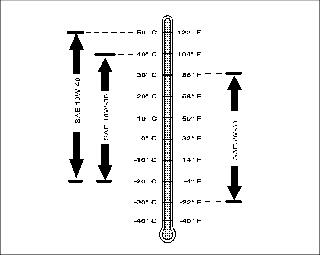
If not using a preferred John Deere oil, use an oil with an API Service Classification SG or higher.
Checking Engine Oil Level
NOTE: Check oil twice per day if engine is run over four hours per day.
Make sure engine is cold when checking engine oil level.
1. Park machine safely. (See Parking Safely in Safety section.)
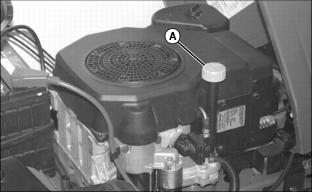
3. Clean area around dipstick (A) to prevent debris from falling into crankcase.
4. Remove dipstick. Wipe with clean cloth.
· GT225 - Install dipstick in tube but do not tighten. Allow dipstick threads to rest on top of tube and rotate cap counterclockwise until it "clicks" or drops into place.
· GT235 - Install and tighten dipstick.
· GT245 - Install dipstick in tube but do not tighten. Allow dipstick threads to rest on top of tube.
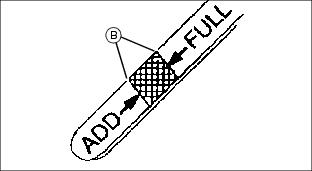
7. Check oil level on dipstick. Oil must be between add and full marks (B).
8. If oil level is low, add oil to bring oil level no higher than full mark on dipstick.
9. Install and tighten dipstick. Lower hood.
Changing Engine Oil and Filter
2. Park machine safely. (See Parking Safely in Safety section.)
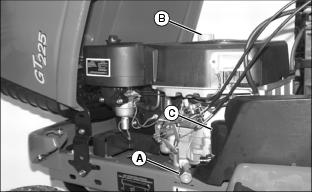
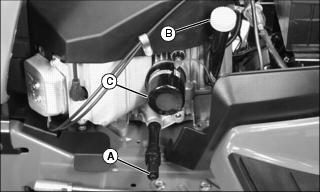
4. Put drain pan under drain valve (A). If available, install drain hose.
5. Open drain valve and drain oil into oil drain pan. Allow oil to drain completely.
a. Wipe dirt from around oil filter (C).
b. Place a drain pan or funnel under filter tray.
c. Remove old filter and wipe off filter tray.
d. Apply a light coat of fresh oil to filter seal.
e. Install replacement oil filter by turning oil filter to right (clockwise) until rubber seal contacts filter base. Tighten filter an additional one-half turn.
· GT235 and GT245: 1.7 L (1.8 qt)
10. Install and tighten dipstick.
11. Start and run engine at idle to check for leaks. Stop engine. Fix any leaks before operating.
12. Check oil level, add oil if necessary.
Cleaning Air Intake Screen and Engine Fins
IMPORTANT: Avoid damage! Engine requires a large amount of air intake when running. Reduced air intake can cause overheating: |
1. Park machine safely. (See Parking Safely in Safety section.)
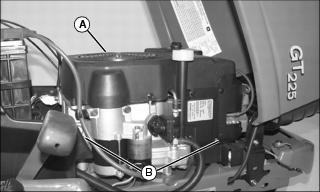
2. Clean air intake screen (A), cooling fins, and external surfaces (B), with rag, brush, vacuum or compressed air.
Servicing Air Cleaner (GT225)
1. Park machine safely. (See Parking Safely in Safety section.)
 c CAUTION: Avoid injury! Touching hot surfaces can burn skin. Engine and components will be hot if engine has been running. Allow engine to cool before servicing.
|
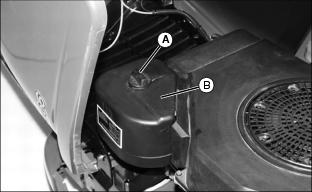
4. Loosen knob (A) and remove air cleaner cover (B).
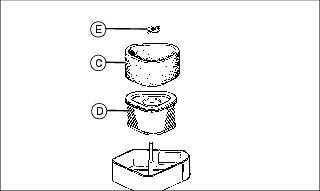
5. Inspect foam precleaner (C) without removing it. If precleaner is dirty:
a. Remove precleaner carefully without removing paper element (D).
b. Wash it in a solution of warm water and liquid detergent. Rinse, squeeze out excess water in a dry cloth, and allow to air dry.
c. Add approximately 30 ml (1 oz) of clean engine oil to precleaner. Squeeze precleaner to distribute oil evenly.
6. Inspect paper element (D) without removing it. If element is damaged or very dirty:
b. Remove paper element carefully from air cleaner housing. Discard paper element.
c. Clean air cleaner housing carefully to prevent dirt from entering carburetor.
d. Install new paper element into air cleaner. Make sure element is seated properly.
7. Install precleaner on paper element.
8. Install air cleaner cover. Do not overtighten.
Servicing Air Cleaner (GT235)
1. Park machine safely. (See Parking Safely in Safety section.)
|
c CAUTION: Avoid injury! Touching hot surfaces can burn skin. Engine and components will be hot if engine has been running. Allow engine to cool before servicing.
|
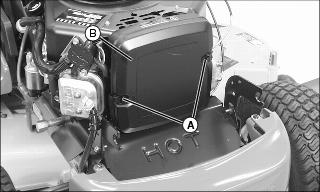
4. Release latches (A) and remove air cleaner cover (B).
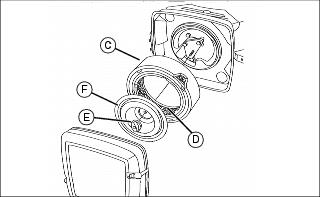
5. Inspect foam precleaner (C) without removing it. If precleaner is dirty:
a. Remove precleaner carefully without removing paper element (D).
b. Wash it in a solution of warm water and liquid detergent. Rinse, squeeze out excess water in a dry cloth, and allow to air dry.
c. Add approximately 30 ml (1 oz) of clean engine oil to precleaner. Squeeze precleaner to distribute oil evenly.
6. Inspect paper element (D) without removing it. If element is damaged or very dirty:
a. Remove knob (E) and plate (F).
b. Remove paper element carefully from air cleaner housing. Discard paper element.
c. Clean air cleaner housing carefully to prevent dirt from entering carburetor.
d. Install new paper element into air cleaner. Make sure element is seated properly.
e. Install plate and secure with knob.
7. Install precleaner on paper element.
8. Install and latch air cleaner cover.
Servicing Air Cleaner (GT245)
1. Park machine safely. (See Parking Safely in Safety section.)
|
c CAUTION: Avoid injury! Touching hot surfaces can burn skin. Engine and components will be hot if engine has been running. Allow engine to cool before servicing.
|
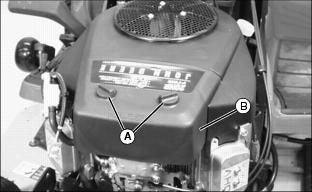
4. Release plastic retainers (A) and remove air cleaner cover (B).
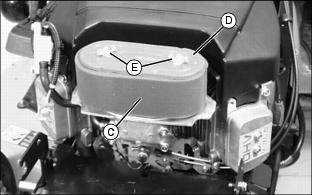
5. Inspect foam precleaner (C) without removing it. If precleaner is dirty:
a. Remove precleaner carefully without removing paper element (D).
b. Wash it in a solution of warm water and liquid detergent. Rinse, squeeze out excess water in a dry cloth, and allow to air dry.
c. Add approximately 30 ml (1 oz) of clean engine oil to precleaner. Squeeze precleaner to distribute oil evenly.
6. Inspect paper element (D) without removing it. If element is damaged or very dirty:
b. Remove paper element carefully from air cleaner housing. Discard paper element.
c. Clean air cleaner housing carefully to prevent dirt from entering carburetor.
d. Install new paper element into air cleaner. Make sure element is seated properly.
7. Install precleaner on paper element.
8. Install and fasten air cleaner cover using original plastic retainers.
Checking Spark Plugs
|
c CAUTION: Avoid injury! Touching hot surfaces can burn skin. Engine and components will be hot if engine has been running. Allow engine to cool before servicing.
|
1. Park machine safely. (See Parking Safely in Safety section.)
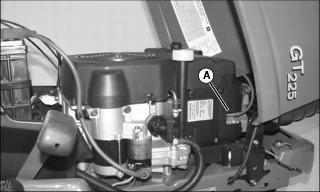
4. Disconnect spark plug wire(s) (A).
6. Clean each spark plug carefully with a wire brush.
· Pitted or damaged electrodes.
NOTE: In Canada, replace spark plug with resistor plug only.
8. Replace spark plugs as necessary.

9. Check plug gap (B) with a wire feeler gauge. To change gap, bend outer electrode (C).
· GT225 - Gap must be 1.00 mm (0.040 in.).
· GT235 - Gap must be 0.75 mm (0.030 in.).
· GT245 - Gap must be 0.75 mm (0.030 in.).
10. Install and tighten spark plugs:
· GT235 and GT245 - 20 N·m (15 lb-ft).
Adjusting Carburetor
NOTE: Carburetor is calibrated by engine manufacturer and is not adjustable.
If engine is operated at altitudes above 1829 m (6,000 ft), some carburetors may require a special high altitude main jet. See your John Deere dealer.
If engine is hard to start or runs rough, check troubleshooting section of this manual.
Possible engine surging will occur at high throttle with transmission in "N" neutral and mower engagement lever disengaged. This is a normal condition due to emission control system.
If engine is still not functioning correctly after performing checks in troubleshooting section, contact your John Deere dealer.
Replacing Fuel Filter
NOTE: Change filter when fuel is low to prevent excessive fuel spillage.
1. Park machine safely. (See Parking Safely in Safety section.)
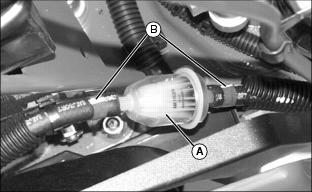
4. Place a drain pan under fuel filter (A).
5. Note direction of arrow on fuel filter so new filter can be installed in same direction.
6. Use a pliers to slide hose clamps (B) away from fuel filter.
7. Disconnect hoses from filter.
IMPORTANT: Avoid damage! Incorrect installation of fuel filter may cause engine damage. Install filter with arrow pointing in direction of fuel flow for proper operation. |
8. Install new filter with arrow pointing in direction of fuel flow. Connect hoses to new filter.