
Introduction
Product Identification
Safety
Operating Machine
Operating Mower Deck - 1600
Replacement Parts
Service Intervals
Service Lubrication
Service Engine
Engine Warranty Maintenance Statement
Raising and Lowering the Engine Cover
Raising and Lowering Seat Platform
Changing Engine Oil and Filter
Cleaning Engine Cooling Screen
Cleaning Oil Cooler Coils and Radiator Cooling Fins
Checking Air Filter Restriction Indicator
Servicing Air Cleaner Elements
Cleaning Rubber Dust Unloading Valve
Checking Radiator Hoses, Air Intake Hoses and Clamps
Servicing Fuel Filter Sediment Bowl
Checking and Adjusting Alternator Belt
Service Transmission
Service Steering & Brakes
Service Mower Deck - 1600
Service Electrical
Service Miscellaneous
Troubleshooting
Storage
Assembly - 1620
Specifications
Warranty
John Deere Quality Statement
Service Record
Copyright© Deere & Company

Service Engine
Engine Warranty Maintenance Statement
Maintenance, repair, or replacement of the emission control devices and systems on this engine, which are being done at the customers expense, may be performed by any non-road engine repair establishment or individual. Warranty repairs must be performed by an authorized John Deere dealer.
Avoid Fumes

 c CAUTION: Avoid injury! Engine exhaust fumes can cause sickness or death:
· If it is necessary to run an engine in an enclosed area, use an exhaust pipe extension to remove the fumes. |
Engine Oil
Use oil viscosity based on the expected air temperature range during the period between oil changes.
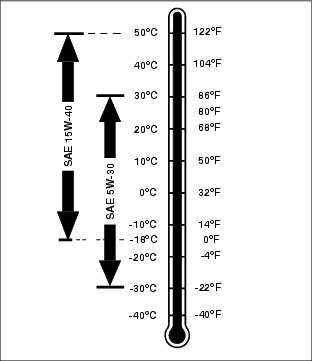
· API Service Classification SH/CF or higher.
Raising and Lowering the Engine Cover
|
c CAUTION: Avoid injury! The engine cover is heavy. To avoid pinched fingers, carefully raise and lower the engine cover by using the handles provided on each side of the engine cover.
|
Machines With Serial Numbers TC1600X010001-020000 or TC1620X010001-020000
1. Park machine safely. (See Parking Safely in the Safety section.)
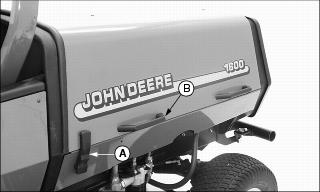
2. Unlock the engine cover latch (A) by pulling up on the bottom of the latch, and unhooking the top from the engine cover. Repeat for other side.
3. Lift the engine cover using the front handle (B) on the side of the engine cover.
4. Open the hood all the way until it comes to rest on the support cables.
NOTE: Before closing the engine cover, make sure the latches on each side of the engine cover are lowered.
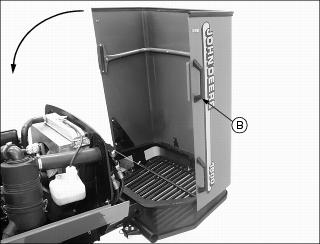
5. Lower the engine cover down using handle (B).
6. Hook the top of the latch over the hook on the engine cover.
7. Push the bottom of the latch down to lock the engine cover in place. Repeat for other side.
Machines Starting With Serial Numbers TC1600X020001 or TC1620X020001
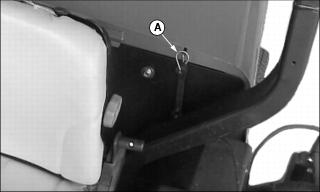
1. Disconnect strap (A) securing the engine cover in the closed position.
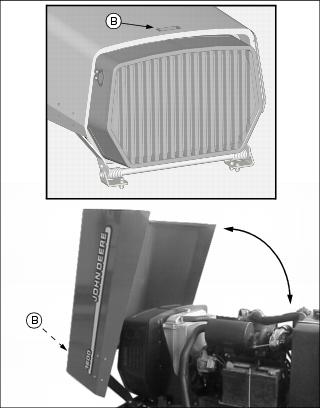
2. Raise engine cover using handle (B). Open engine cover completely until it comes to rest.
3. Carefully lower engine cover using handle (B).
4. Connect strap (A) to secure engine cover in the closed position.
Raising and Lowering Seat Platform
|
c CAUTION: Avoid injury! Fingers may get caught in seat frame pinch point. Use care when raising and lowering the seat.
|

1. Stand on the operator's platform facing the operator's seat.
2. Pull forward on the lift release knob (A), while pulling forward and upward on the backrest of the operator's seat.
3. Raise the seat platform until it latches in the first or second raised position.
1. Pull the operator's seat forward and upward using the seat backrest.
2. Pull and hold the release lever (B) forward while lowering the seat platform.
Checking Engine Oil
1. Park machine safely. (See Park Safely in the Safety section.)
IMPORTANT: Avoid damage! Avoid dirt and other contaminants from entering the oil dipstick tube location. Clean area around dipstick before removing. |
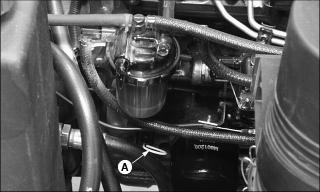
3. Remove dipstick (A) located on the LEFT side of the engine. Wipe dipstick with a clean cloth.
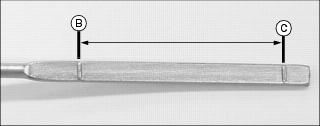
5. Remove dipstick. Check oil level. Oil should be between levels (B) and (C) on the dipstick.
· If oil is low, add oil to bring oil level no higher than level (B) on the dipstick.
· If oil is above level (B) on the dipstick, drain to proper level.
Changing Engine Oil and Filter
2. Park machine safely. (See Parking Safely in the Safety section.)
4. Place a drain pan under the oil drain location.
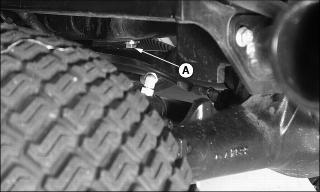
5. Remove drain plug (A) located under the engine.
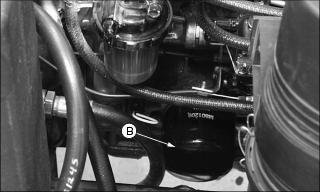
6. Remove oil filter (B) located under the LEFT side of the engine. Turn filter counterclockwise to remove.
7. Clean filter mounting surface on engine with a clean cloth.
8. Apply a film of clean engine oil on gasket of new filter.
· Turn filter clockwise until filter makes contact with the mounting surface. Tighten 1/2-3/4 turn after gasket contact.
10. Install oil drain plug. DO NOT overtighten.
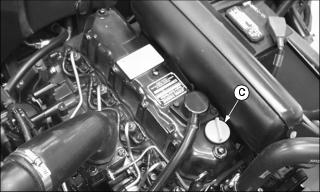
11. Remove oil fill cap (C) on top of engine.
12. Add approximately 6.6 L (7 qt) of oil.
· Run engine at a slow throttle speed for approximately two minutes.
· Check area under engine for oil leaks.
16. After approximately two minutes check engine oil level.
IMPORTANT: Avoid damage! Avoid dirt and other contaminants from entering the oil dipstick tube location. Clean area around dipstick before removing. |
17. Remove dipstick. Wipe with a clean cloth.
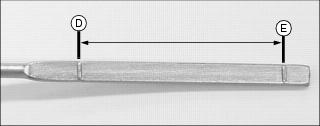
19. Remove dipstick. Check oil level. Oil should be between levels (D) and (E) on the dipstick.
· If oil is low, add oil to bring oil level no higher than level (D) on the dipstick.
· If oil is above level (D) on the dipstick, drain to proper level.
Cleaning Engine Cooling Screen
|
c CAUTION: Avoid injury! Wear personal eye protection when using compressed air for cleaning purposes.
|
IMPORTANT: Avoid damage! Engine cover screen must be clean to prevent the engine from overheating and to allow adequate air intake. |
Machines With Serial Numbers TC1600X010001-020000 or TC1620X010001-020000
1. Park machine safely. (See Parking Safely in the Safety section.)
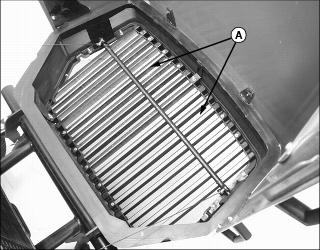
3. Clean screen (A) with a brush, compressed air or water.
Machines Starting With Serial Numbers TC1600X020001 or TC1620X020001
1. Park machine safely. (See Parking Safely in the Safety section.)
2. Stand behind the machine facing the rear cooling screen.
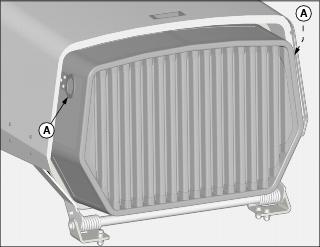
3. Pull cooling screen directly to the rear using handles (A) to remove.
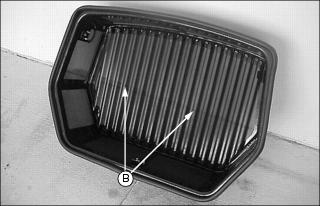
4. Clean screen (B) with a brush, compressed air or water.
· Align latching hardware on screen and radiator mounting plate.
· Make sure screen snaps into position with all three latches fully engaged.
Cleaning Oil Cooler Coils and Radiator Cooling Fins
|
c CAUTION: Avoid injury! Wear personal eye protection when using compressed air for cleaning purposes.
|
IMPORTANT: Avoid damage! Oil cooler coils and radiator cooling fins must be clean to prevent the engine from overheating and to allow adequate air intake. |
Machines With Serial Numbers TC1600X010001-020000 or TC1620X010001-020000
1. Park machine safely. (See Parking Safely in the Safety section.)
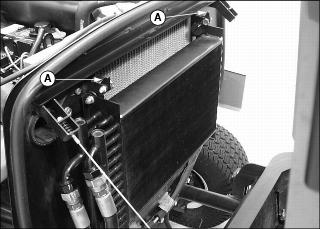
4. Release latches (A) securing oil cooler to the radiator mounting brackets.
5. Carefully lower oil cooler down and away from the radiator.
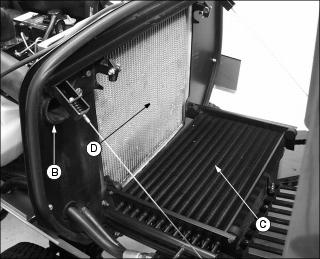
6. Remove dirt and debris from oil cooler coils (C) and radiator fins (D) using compressed air or water.
7. Check oil cooler coils and radiator fins for damage.
Machines Starting With Serial Numbers TC1600X020001 or TC1620X020001
1. Park machine safely. (See Parking Safely in the Safety section.)
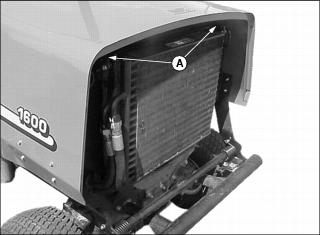
4. Release latches (A) securing oil cooler to the radiator mounting brackets.
5. Carefully lower oil cooler down and away from the radiator.
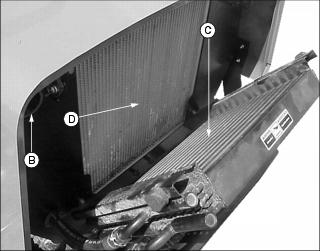
6. Remove dirt and debris from oil cooler coils (C) and radiator fins (D) using compressed air or water.
7. Check oil cooler coils and radiator fins for damage.
Checking Air Filter Restriction Indicator
1. Park machine safely. (See Parking Safely in the Safety section.)
NOTE: Indicator will not function correctly if plastic indicator housing is damaged.
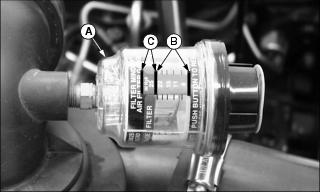
3. Check air restriction indicator (A).
· When the yellow plunger inside the indicator is visible in the green zone (B), no air cleaner service is required.
· When yellow plunger inside the indicator is visible inside the red zone (C), air cleaner needs replacement.
Servicing Air Cleaner Elements
|
· When operating the machine in extreme heat, dust or other severe conditions, check the air restriction indicator daily. · Never run the engine without the air cleaner elements installed. |
Primary Air Filter Element
1. Park machine safely. (See Parking Safely in the Safety section.)
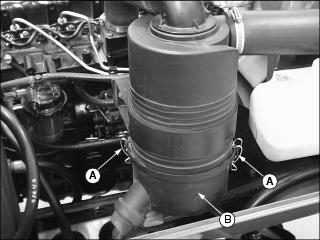
4. Release latches (A) and remove air cleaner canister cover (B).
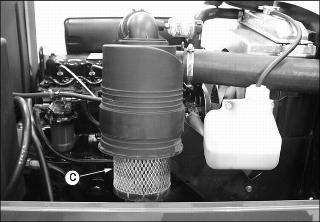
5. Remove and discard primary element (C). Replace with a new primary filter element.
6. Install air cleaner canister cover.
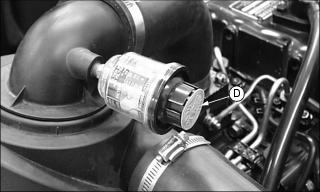
7. Push reset button (D) on the air restriction indicator.
8. Start engine. Allow engine to run approximately one minute at maximum throttle speed.
10. Check air restriction indicator.
· If yellow plunger inside the indicator is visible inside the red zone, replace secondary air filter element.
Secondary Air Filter Element
1. Remove air cleaner canister cover.
2. Remove primary air filter element.
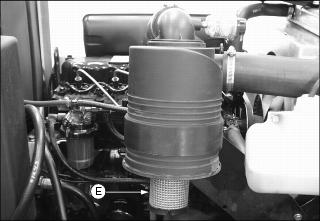
3. Remove and discard secondary air filter element (E). Replace with a new secondary air filter element.
4. Install primary air filter element.
5. Install air cleaner canister cover.
Cleaning Rubber Dust Unloading Valve
IMPORTANT: Avoid damage! Never operate the engine without air cleaner elements and rubber dust unloading valve installed. |
1. Park machine safely. (See Parking Safely in the Safety section.)
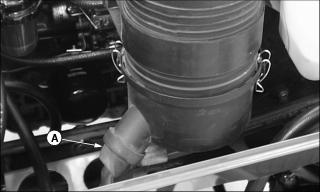
4. Remove dust unloading valve (A) and clean. Replace if damaged.
5. Install dust unloading valve.
Checking Radiator Hoses, Air Intake Hoses and Clamps
1. Park machine safely. (See Parking Safely in the Safety section.)
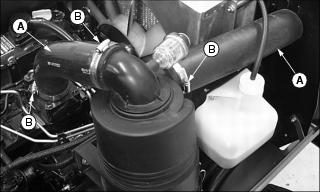
4. Check air intake hoses (A).
· Check hoses for cracks or damage. Replace if necessary.
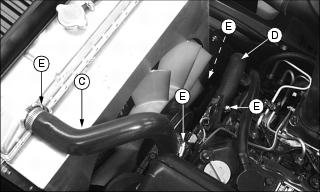
5. Check upper radiator hose (C) and lower radiator hose (D).
· Check hoses for cracks or damage. Replace if necessary.
Recommended Engine Coolant
The following John Deere coolant is preferred:
· COOL-GARD PRE-DILUTED SUMMER COOLANT (TY16036).
· COOL-GARD CONCENTRATED SUMMER COOLANT (TY16034)
If neither of the above coolants is available, use an ethylene glycol base coolant that meets the following specification:
Check container label before using to be sure it has the appropriate specifications for your machine. Use coolant with conditioner or add conditioner to coolant before using.
If using concentrate, mix approximately 50 percent antifreeze with 50 percent distilled or deionized water before adding to cooling system. This mixture will provide freeze protection to -37 degrees C (-34 degrees F).
Certain geographical areas may require lower temperature protection. See the label on your antifreeze container or consult your John Deere dealer to obtain the latest information and recommendations.
Checking Coolant Level
1. Park machine safely. (See Parking Safely in the Safety section.)
2. Allow engine to cool. Raise engine cover.
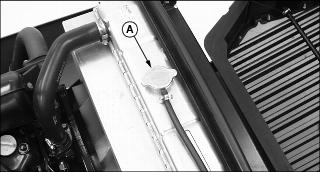
3. Remove radiator cap (A) and check coolant level is up to filler neck.
4. If coolant is low, add specified ratio of antifreeze and water.
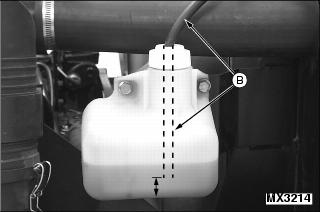
6. Check coolant recovery tank. Make sure the overflow hose (B) is not touching the bottom of the recovery tank.
7. Coolant recovery tank should be half full at engine operating temperature.
8. If necessary, clean debris from the engine cover screen, oil cooler coils and radiator cooling fins.
9. Check condition of hoses and clamps. Check for leaks or loose connections.
Draining Cooling System
|
· DO NOT operate engine without coolant. · DO NOT pour coolant into the radiator when the engine is hot. |
1. Park machine safely. (See Parking Safely in the Safety section.)
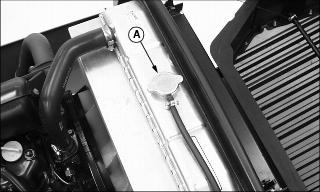
4. Slowly open radiator cap (A) to the first stop to release all pressure.
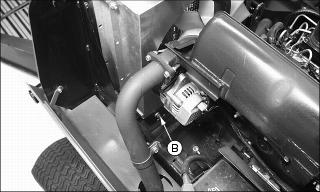
5. Open petcock (B) located on the RIGHT side of the radiator. Drain coolant into a pan.
6. Close petcock after all coolant has drained from the radiator.
Flushing Cooling System
1. Drain cooling system and add John Deere Cooling System Cleaner, or John Deere Cooling System Quick Flush or equivalent. Fill system with clean water. Follow directions on can.
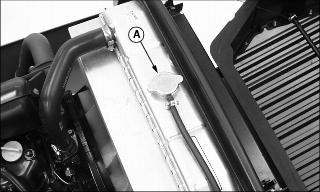
2. Install and tighten radiator cap (A).
3. Start and run engine until it reaches operating temperature.
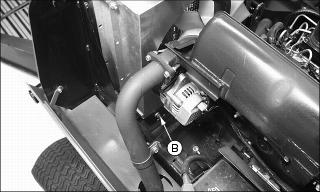
· Drain cooling system immediately before rust and dirt settle.
7. Fill cooling system with clean water and repeat flushing until system is clean.
8. Drain system and fill with coolant.
Filling Cooling System
1. With engine and cooling system cool, open radiator cap to the first stop to release all pressure. Press down on cap slightly and turn counterclockwise to remove.
NOTE: Cooling system capacity is 6.6 L (7 qt).
· Certain geographical areas may require lower temperature protection. See the label on your antifreeze container or consult your John Deere dealer to obtain the latest information and recommendations.
· John Deere Cooling System Sealer or its equivalent may be added to the radiator to seal leaks. DO NOT use any other additives in the cooling system.
3. Start engine and watch coolant level in radiator. Add coolant if necessary to bring coolant level up to filler neck.
4. Install and tighten radiator cap. Run engine until at operating temperature.
5. Stop engine and allow to cool down.
7. Check condition of hoses and clamps. Check for leaks or loose connections.
NOTE: Coolant recovery tank is used to catch overflow from radiator, and will be about half full during full power operation. Coolant will flow back into radiator as system cools.
Servicing Fuel Filter Sediment Bowl
NOTE: Change filter when fuel level is low.
Checking
1. Park machine safely. (See Parking Safely in the Safety section.)
4. Locate the fuel filter sediment bowl on the LEFT side of the engine.
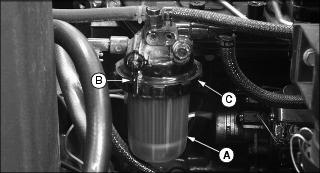
5. Look for water and deposits in the sediment bowl (A).
Cleaning and Replacing
1. Close fuel shut-off valve (B) by turning to the horizontal position.
2. Turn collar (C) to remove bowl and filter. Discard filter.
3. Clean bowl and install new filter.
4. Install bowl and collar. Tighten collar hand tight.
5. Open fuel shut-off valve by turning lever to vertical position (shown).
6. Prime fuel system using primer lever on fuel pump.
7. Start engine and check for leaks.
Priming Fuel System
NOTE: It may be necessary to prime the fuel system after running out of fuel or changing the fuel filter.
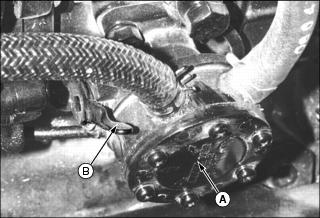
1. Locate the fuel pump (A) on left rear side of engine behind air cleaner housing.
2. Pump priming lever (B) on fuel pump until fuel fills up glass bowl of fuel filter.
3. Start engine. If engine will not start, repeat priming system.
Checking and Adjusting Alternator Belt
|
c CAUTION: Avoid injury! Fingers or loose clothing can get caught in rotating parts. Stop engine and wait for all moving parts to stop.
|
Check Belt Tension
1. Park machine safely. (See Parking Safely in the Safety section.)
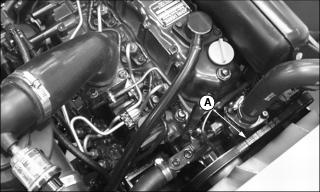
· Inspect belt for excessive were, damage or stretching while in position on the fan, alternator and flywheel sheaves.
· Apply thumb pressure to the belt approximately halfway between the sheaves. Belt should deflect inward approximately 10-15 mm (3/8 - 1/2 in.).
Adjusting Belt Tension
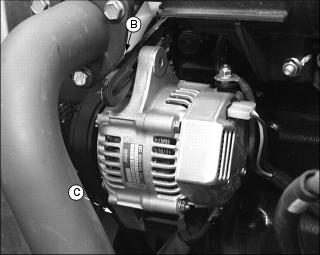
Picture Note: Alternator located on RIGHT side of engine.
1. Loosen adjustment bolt (B).
2. Loosen alternator mounting bolt (C).
3. Apply outward pressure to the alternator housing.
4. Tighten adjustment bolt (B) and mounting bolt (C).
· Apply thumb pressure to the belt approximately halfway between the sheaves. Belt should deflect inward approximately 9.5 mm (3/8 in.).
Replacing Alternator Belt
|
c CAUTION: Avoid injury! Entanglement in a belt, pulley or contact with a rotating fan blade can occur when performing this service procedure. Stop engine and wait for all moving parts to stop.
|
1. Park machine safely. (See Parking Safely in the Safely section.)

Picture Note: Alternator located on RIGHT side of engine.
4. Loosen alternator mounting bolt (A).
5. Loosen and remove adjustment bolt (B).
6. Apply inward pressure to the alternator housing.
7. Remove worn belt from the alternator sheave and both engine sheaves.
NOTE: It may be necessary to loosen nuts holding radiator fan shroud to radiator, and to raise or lower shroud until enough clearance can be gained to pull belt between fan blades and shroud.
8. Install new belt over fan blades and engine sheaves, and over alternator pulley.