
2653 Professional Utility Mower
Introduction
Safety Signs
Controls
Operating Machine
Operating Cutting Unit
Replacement Parts
Service Machine Safely
Service Intervals
Service Lubrication
Service Engine
Service Transmission
Service Cutting Units
Service Electrical
Checking Battery Electrolyte Level
Charging The Battery (Continued)
Replacing Indicator LIght Bulb
Service Miscellaneous
Troubleshooting
Storing Utility Mower
Assembly
Copyright© Deere & Company

Service Electrical
Cleaning Or Replacing Battery
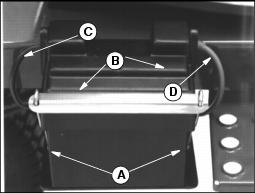
1. Loosen wing nuts (A) to remove hold-down and cover (B).
2. Remove negative (black) cable (C) from battery first.
3. Remove positive (red) cable (D).
4. If battery is very dirty, remove battery.
5. Clean battery, battery terminals, cable ends, hold-down and cover, and battery ledge with a solution of 1 part baking soda to 4 parts water. KEEP solution out of battery cells.
6. Rinse all parts with clean water. Let dry.
8. Check cell caps to be sure vent holes are open.
9. Connect positive (red) cable to battery first, then negative (black) cable.
10. Apply petroleum jelly on battery terminals to help prevent corrosion.
11. Install battery hold-down and covers (B) and fasten with washers and wing nuts (A) below battery support bracket.
Checking Battery Electrolyte Level
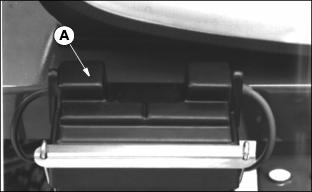
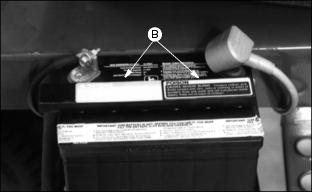
IMPORTANT: Avoid damage! DO NOT fill cells to the bottom of the filler neck (C). Electrolyte can overflow when battery is charged and cause damage. |
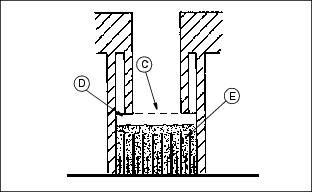
1. Electrolyte (D) should be 6 mm (1/4 in.) above plates (E).
2. Add distilled water if necessary.
Charge The Battery Safely
Follow instructions on the battery charger or in the charger operator's manual, or use the instructions below as a guide.
· Wait until the battery has warmed to room temperature. Do not charge a frozen battery.
· Check the electrolyte level of each cell. (See Checking Battery Electrolyte Level in this section.)
· Install the battery cap(s) on the battery.
Turn OFF and unplug the charger before you connect cables to the battery or disconnect cables from the battery.
If the battery becomes warm to touch during charging:
· Stop charging the battery until it cools.
Charging The Battery (Continued)
 c CAUTION: Avoid injury! DO NOT charge a frozen battery. Battery gases can explode. Keep cigarettes, sparks, and flames away from battery.
|
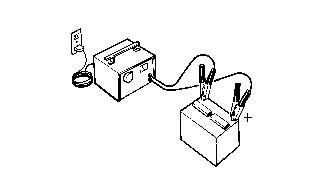
1. Remove and clean battery. (See Checking and Cleaning Battery this section).
2. Check electrolyte level. (See Checking Battery Electrolyte Level in this section.)
|
c CAUTION: Avoid injury! To avoid injury, before you connect or disconnect charger cables to battery, unplug charger cord.
|
3. Leave cell caps on battery while you charge it.
4. Connect positive (+) charger cable to positive (+) battery terminal.
5. Connect negative (-) charger cable to negative (-) battery terminal.
7. Charge Battery. See Charging Rates on the next page.
8. Unplug charger cord. Remove charger cables.
9. Install battery. (See Replacing Battery in this section).
Charging Rates
See your battery charger or charger operator's manual for information on charging. Or read the information below to FULLY CHARGE your battery.
For a charger with a CURRENT ADJUSTMENT CONTROL:
· Adjust the control to 10 amps.
· Charge the battery for 6-8 hours.
For a charger with a switch for MAINTENANCE FREE, DEEP CYCLE, or NORMAL (CONVENTIONAL) setting:
· Use the MAINTENANCE FREE or DEEP CYCLE setting.
For a charger with SLOW CHARGE, FAST CHARGE, or BOOST CHARGE setting:
· DO NOT use the BOOST CHARGE setting.
· Use the SLOW CHARGE setting:
· - For a charger rated at less than 10 amps.
· Use the FAST CHARGE setting:
· - For a charger rated at 10 amps.
NOTE: NOTE: Your charger may have an AUTOMATIC STOP to prevent charging the battery:
· When the battery is fully charged OR
· When the battery is not in condition to take a charge.
Using Booster Battery
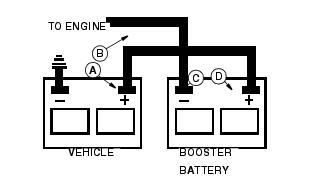
Connect positive (+) booster cable to booster battery positive (+) post (D).
Connect the other end of positive (+) booster cable to vehicle battery positive (+) post (A).
Connect negative (-) booster cable to booster battery negative (-) post (C).
Connect the other end of negative (-) booster cable to engine ground (B) away from battery.
Replacing Fuses
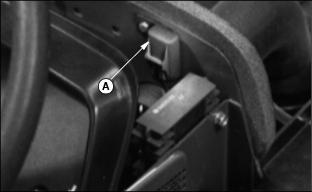
1. Raise the hood and open the fuse holder.
2. Pull fuse (A) out of socket. A metal clip in the fuse will be broken if defective.
3. Push new 15 amp fuse into socket. Be sure to replace fuse with same amperage. (See your John Deere distributor or an automotive parts store for fuse replacement.)
Check Spark Plugs
|
c CAUTION: Avoid injury! Before removing spark plugs:
|
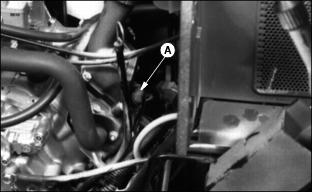
2. Disconnect spark plug wires (A).
NOTE: Engine has two spark plugs (one each side of engine).
4. Clean spark plugs carefully with a wire brush.
· Pitted or damaged electrodes.
NOTE: In Canada, replace spark plugs with resistor type plug.
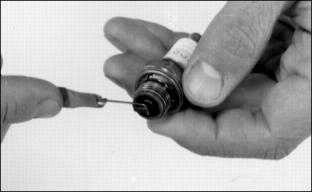
6. Replace spark plugs as necessary.
7. Check plug gap using a wire feeler gauge.
8. Gap must be 0.7 mm (0.028 in.).
9. To change gap, bend electrode.
10. Install and tighten spark plugs. Tighten plugs to 20 N·m (15 lb-ft.).
Replacing Indicator LIght Bulb
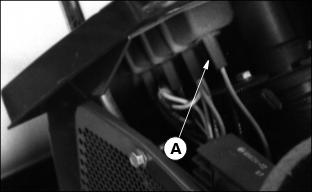
1. To remove bulbs use a 1/4 turn counterclockwise of the bulb holder (A).
2. Pull the burnt out bulb straight out: DO NOT twist.
3. Push the new bulb straight in.
4. Install bulb holder with a 1/4 turn clockwise twisting motion.